
Is Your Store Visible to AI Shopping Agents?

Othmane Khadri · Founder, Earleads

Summary
Your store is visible to AI shopping agents when their crawlers can reach your pages, every variant has its own price, size and stock in a feed, your products sit in the catalogs agents read (Shopify Catalog, Google Merchant Center, ChatGPT and Perplexity), checkout doesn't stall a bot, and reviews back up your claims.
On this page
- What does visible to AI shopping agents mean?
- The agentic commerce readiness check at a glance
- Step 1: Check that AI crawlers can reach your product pages
- Step 2: Check product data for every variant
- Step 3: Check you’re in the catalogs agents actually read
- Step 4: Check that checkout doesn’t stop an agent
- Step 5: Check that reviews and third party coverage back you up
- Step 6: Ask the agents directly
- What changes for B2B brands?
- What to fix first
What does visible to AI shopping agents mean?
An AI shopping agent takes a request like “waterproof trail shoes, size 10, under $150, here by Friday” and returns a short list, or buys the pair outright. Your store is visible to AI shopping agents when it survives every step of that errand. The agent has to reach your pages, read a price and stock level it trusts, find you in the catalog it searches, and finish checkout without hitting a wall.
Most stores fail one step quietly. Nothing breaks on the site, traffic from Google looks normal, and yet the product never shows up when someone asks ChatGPT or Gemini for it.
The money is real enough to check. Shopify reports that AI driven traffic to Shopify stores grew 8x year over year in Q1 2026, while orders from AI powered searches grew nearly 13x. In the same piece Shopify names what decides which products surface, namely “data quality, relevance, availability, pricing, and engagement signals.”
Our earlier guide on how to get recommended by AI agents like Instinct explains why agents pick some brands over others. This one is the hands on version. Six checks, each with a test you can run in a few minutes, and what to fix when it fails.
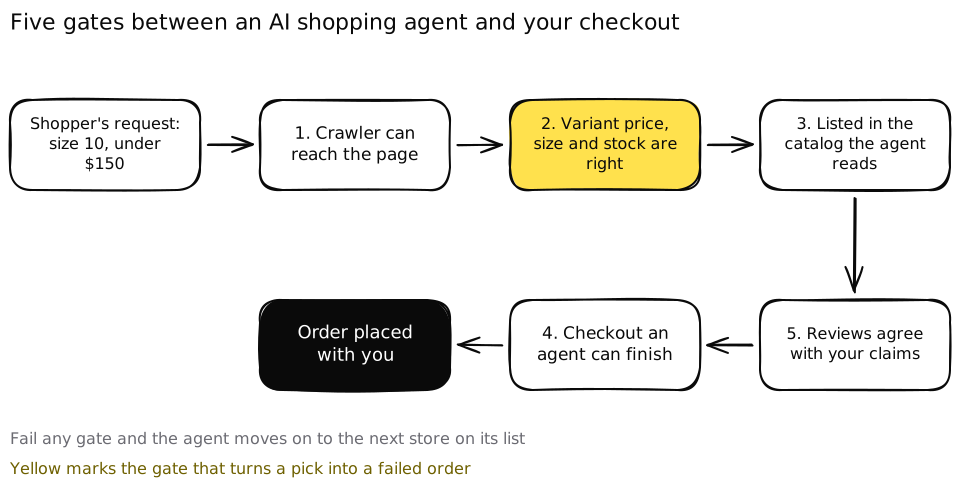 An agent’s errand passes five gates before an order lands with you, and failing any one of them hands the sale to the next store.
The agentic commerce readiness check at a glance
Run the checks in order. The first ones are cheap and fast, and a failure early on makes the later ones pointless.
| Check | What you’re testing | How to verify | Time |
|---|---|---|---|
| 1. Crawler access | Search bots from OpenAI, Perplexity and Google can load product pages | Read robots.txt, check firewall bot settings, test with a bot user agent | 5 min |
| 2. Product data per variant | Every variant has its own price, size, color and stock | Rich Results Test or Shopify’s agentic readiness scan on 3 product URLs | 10 min |
| 3. Catalogs agents read | You’re listed in Shopify Catalog, Merchant Center, ChatGPT and Perplexity | Check each channel’s admin or onboarding status | 15 min |
| 4. Checkout | A buyer with no account and no patience can finish | Buy a test product in a private window, count the steps | 10 min |
| 5. Reviews and coverage | Third party sources agree with what you claim | Search your brand plus “review” and read what comes back | 10 min |
| 6. Ask the agents | You show up for real requests | Run 10 shopper requests in ChatGPT, Gemini, AI Mode and Perplexity | 30 min |
An hour and a half covers all six. You won’t fix everything in that time, but you’ll know where you stand, which is more than most stores can say.
Step 1: Check that AI crawlers can reach your product pages
This is the cheapest check, and when it fails it fails quietly, often because of a security rule set years before shopping agents existed.
The trap is that AI companies run several bots, and each does a different job. OpenAI’s own documentation says OAI-SearchBot “is used to surface websites in search results in ChatGPT’s search features”, while GPTBot crawls content that may be used to train its models, and ChatGPT-User visits pages when a person asks ChatGPT something, where “robots.txt rules may not apply.” Perplexity splits things the same way. Its documentation says PerplexityBot surfaces and links websites in search results and isn’t used to train foundation models, while Perplexity-User fetches pages on a user’s request and “generally ignores robots.txt rules.”
Google works differently. Its AI features sit on top of Google Search, which Googlebot crawls, and its shopping surfaces read Merchant Center feeds. Google says Google-Extended “does not impact a site’s inclusion in Google Search nor is it used as a ranking signal in Google Search”. It governs whether your content trains Gemini models and grounds Gemini answers.
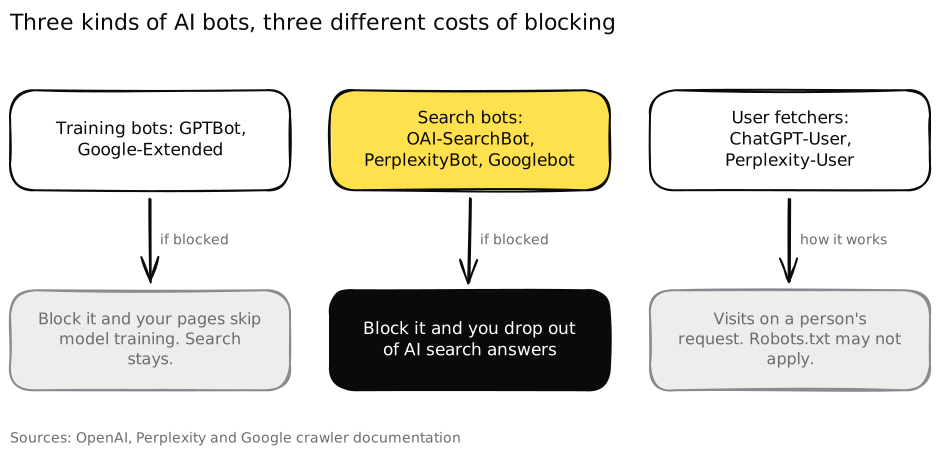 Blocking a training bot is a content decision. Blocking a search bot takes you out of the answers.
So a store can block training and stay visible in AI search. What it can’t do is block the search bots and expect to be recommended.
How to verify it in 5 minutes:
- Open yourstore.com/robots.txt. Look for
Disallowrules under OAI-SearchBot, PerplexityBot, Googlebot or a blanketUser-agent: *that covers/products/or/collections/. - If you’re behind Cloudflare, open the bot settings. Cloudflare changed its default in July 2025 to block AI crawlers unless site owners allow them, and every new domain is asked at signup whether to let them in. Someone on your team may have clicked through that screen without thinking about shopping.
- Request a product page with a bot user agent, for example
curl -I -A "OAI-SearchBot" https://yourstore.com/products/your-product. A 403 or a challenge page means something in front of your store is turning bots away. Real bots are verified by IP range, so a 200 here isn’t proof, but a block almost always is. - Make sure prices and stock appear in the page HTML, not only after JavaScript runs. View the page source and search for the price. If it isn’t there, many crawlers won’t see it either.
If it fails: allow the search bots by name, decide separately about training bots, and ask whoever owns your firewall to list the AI bot rules that are active. Treat it as a business choice, not a default.
Step 2: Check product data for every variant
An agent shopping for “size 10, in black, in stock” doesn’t care that the product exists. It cares whether the size 10 black one exists, at what price, right now. That’s a variant level question, and most catalogs answer it at product level.
The two biggest specs agree on what’s needed. Google’s Merchant Center product data specification requires price and availability and says the price must “match with the price from your landing page, structured data, and at checkout.” It requires item_group_id for variants in the US, UK, Germany, France, Japan and Brazil, and size and color for apparel sold in those countries. OpenAI’s product feed spec asks for a stable item_id per variant sharing a group_id, with availability set to one of in_stock, out_of_stock, pre_order, backorder or unknown. It tells merchants to update the feed when a sale starts or ends and when an item sells out.
On the page itself, Google’s merchant listing structured data requires a name, an image and an offer with a price above zero. It recommends aggregateRating and review, and suggests each variant gets a distinct URL.
What clean looks like:
- Each variant has its own ID, price, size, color and stock status.
- The price in the feed, in the structured data and at checkout is the same number.
- Out of stock variants say out of stock instead of staying live.
- Titles use the words shoppers type (“women’s waterproof trail running shoe”), not internal names (“Model X 24 FW”).
- Sale prices start and end in the feed on the same day they do on the site.
How to verify it in 10 minutes: pick three products, one simple, one with many sizes and one on sale. Run each URL through Google’s Rich Results Test and Shopify’s free agentic readiness scan, which says “we check your product page for the structured data that AI agents read to answer shoppers’ questions.” Then pick a size that’s sold out and see what the page and the structured data say. If it still reads InStock, an agent will try to buy something you can’t ship.
If it fails: fix the source of truth first, usually your platform’s product records or your feed tool, then let the fixes flow into every channel. Patching one channel by hand creates a second version of the truth, which is how mismatches start.
Service, travel and dining businesses run the same check with rates, room types, opening hours and booking availability. The variant just has a different name.
Step 3: Check you’re in the catalogs agents actually read
Being crawlable gets you into search answers. Being in a catalog gets you into the product cards, comparisons and checkouts that shopping agents use. There are four worth checking, and they overlap more than you’d think.
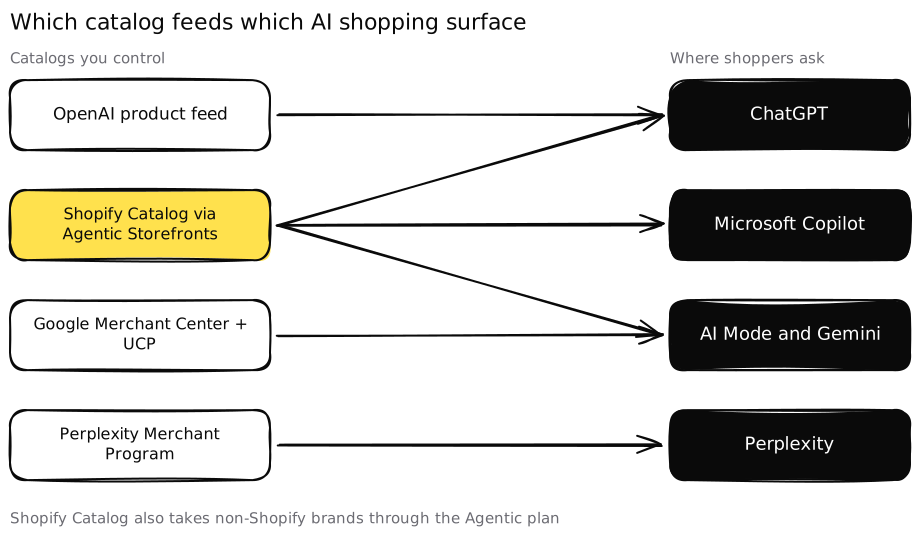 Four catalogs cover the main AI shopping surfaces, and Shopify Catalog reaches several of them at once.
Shopify Catalog and Agentic Storefronts
Shopify’s Agentic Storefronts give merchants access to ChatGPT, Microsoft Copilot, AI Mode in Google Search and the Gemini app, managed from the Shopify admin. Shopify’s help center says Agentic Storefronts are “active by default for eligible stores”, and you manage each channel under Sales channels, then Agentic.
“Eligible” carries a lot of weight. Shopify’s Catalog requirements include being on the Starter plan or higher, not being in private mode, products with a title, at least one image, a price above zero, a published product URL, and not being Unlisted or hidden from search engines. A store that hid products from search engines years ago for an unrelated reason can be missing from every AI channel at once.
Verify: open the Agentic page in your admin. Since May 2026 it shows performance across AI channels and “which queries you rank for”, plus recommendations on product data. Brands not on Shopify can use the Agentic plan to add products to Shopify Catalog.
Google Merchant Center and UCP
Google’s Universal Commerce Protocol “enables direct, instant purchases across AI surfaces like AI Mode in Google Search and the Gemini app.” You stay the merchant of record, and onboarding runs through your existing Merchant Center account and shopping feeds. So a healthy Merchant Center feed is the entry ticket to Google’s agent shopping.
Verify: log in to Merchant Center and open the product diagnostics. Disapproved or limited products can’t be shown, and since Google requires price and availability to match your landing page, read any mismatch warnings first.
OpenAI product feeds for ChatGPT
OpenAI’s commerce documentation asks merchants to “provide a structured product feed so ChatGPT accurately indexes and displays your products with up-to-date price and availability.” Checkout inside ChatGPT has moved, though. In March 2026 an OpenAI spokesperson told Digital Commerce 360 that “Instant Checkout is moving to Apps” and that OpenAI is prioritizing “ChatGPT search and product discovery,” with the Agentic Commerce Protocol, which Stripe open sourced with OpenAI, as the infrastructure underneath.
Verify: if you’re on Shopify with Agentic Storefronts on, ChatGPT is already one of your channels. If not, check whether your platform or feed tool supports OpenAI’s feed format, and whether is_eligible_search is left at its default of true.
Perplexity Merchant Program
Perplexity’s Merchant Program is free, and Perplexity says joining increases the chance of being a “recommended product” because it has richer details about your catalog.
Verify: search Perplexity for one of your products by name and see whether it appears as a product card or only as a link.
Step 4: Check that checkout doesn’t stop an agent
Discovery is moving faster than checkout. OpenAI has stepped back from buying inside ChatGPT, while others push ahead. Shopify added WebMCP tools called get_checkout, update_checkout and complete_checkout so browser based agents can finish a purchase with the buyer’s authorization, TechCrunch reported in September 2026. The same piece noted that Amazon and Adidas reportedly block agents from buying on users’ behalf.
Either way, the sale ends on a checkout you control, whether a person clicks through from an AI answer or an agent drives the browser. Every step it can’t pass sends the order somewhere else.
How to verify it in 10 minutes: open a private browser window, add a product to the cart and try to pay as a first time buyer. Count what gets in the way:
- A forced account creation before payment.
- A CAPTCHA or bot challenge on cart or checkout.
- Popups that cover the form and need a click to close.
- Shipping costs or delivery dates that only appear on the last step.
- Express wallets like Shop Pay, PayPal, Apple Pay or Google Pay missing.
If it fails: offer guest checkout, move bot challenges off the checkout path or tune them to allow verified agents, and show shipping cost and delivery date on the product page. These fixes help human buyers too, which makes them easy to approve.
Blocking agents can be the right call for some retailers. Make it a decision someone signed off on, with the cost written down, not a side effect of a fraud rule.
Step 5: Check that reviews and third party coverage back you up
Agents don’t only read your feed. They check it against what the rest of the web says. Shopify lists engagement signals among the factors that decide which products surface, and Google recommends aggregateRating and review in product structured data.
The underlying language models also form an opinion of your brand from reviews, press, roundups and community threads. If those sources say you run small, ship slowly or overcharge, an agent working for a shopper has every reason to pick someone else, even with a perfect feed.
How to verify it in 10 minutes:
- Search your brand plus “review,” your brand plus “reddit,” and “best [your category] for [use case].”
- Note whether you appear in the roundups that rank, and whether reviewers describe you the way your product pages do.
- Check your product pages show a review count and rating in the structured data, not only as an image or a widget that loads late.
If it fails: this is the slow part. Ask recent buyers for reviews on the platforms your shoppers trust, pitch the roundups that rank for your category, and answer real questions in the threads where people ask for recommendations. Our guide to getting recommended by AI agents covers this source work in more depth.
Step 6: Ask the agents directly
The final check is the one that tells you whether the first five worked. Write 10 requests your shoppers would hand an AI, in their words, with real constraints:
- A budget (“under $120”).
- A size, color or fit.
- A deadline (“arrives before Saturday”).
- A use case (“for wide feet,” “for a small apartment”).
Run each one in ChatGPT, Gemini, Google’s AI Mode and Perplexity. For every answer log four things. Were you mentioned, were you the first pick, was the price and stock right, and could the shopper buy from you in one or two clicks.
Keep the list fixed and rerun it monthly. AI answers vary from run to run, so one result is an anecdote and a trend across months is a signal. Our AI visibility audit guide explains how to keep that measurement honest.
Read the results against the earlier steps. If you’re missing everywhere, look at Steps 1 and 3. If you’re mentioned with the wrong price, it’s Step 2. If competitors get the pick and you get a mention, it’s usually Step 5.
What changes for B2B brands?
Shopping agents grab the headlines because they buy consumer products today. B2B brands go through the same gates when a buyer asks an assistant to “list three tools that do X for under $Y per seat and integrate with Z.”
The checks translate directly:
- Crawler access: the same bots need to reach your pricing, integrations and docs pages.
- Product data: your “variants” are plans and seats. Publish plan names, prices or starting prices, and what each plan includes.
- Catalogs: review sites like G2 and the marketplaces of the tools you integrate with play the role of Merchant Center.
- Checkout: a trial or demo booking flow that doesn’t demand ten form fields before showing anything.
- Reviews: consistent descriptions across review sites, analyst notes and community threads.
A B2B brand hiding pricing behind a contact form fails the agent’s version of Step 2. The assistant can’t confirm the budget fits, so it shortlists someone who publishes a number.
What to fix first
If the readiness check turns up several failures, fix them in the order the agent hits them. A blocked crawler or a missing catalog listing makes everything after it irrelevant. Wrong variant data comes next, because it turns a pick into a failed order. Checkout friction follows, and reviews and coverage are the long game that runs in parallel.
Two things to avoid. Don’t buy a “guaranteed ChatGPT placement,” because nobody outside OpenAI, Google or Perplexity controls what their systems recommend. And don’t publish invented protocol files because a blog post told you agents need them. Stick to the specs the platforms document themselves.
This is the work we do at Earleads for B2B and B2C brands, from crawler and feed checks to the sources AI answers rely on. If you’d rather see the full picture than run it yourself, our free AI visibility audit checks how ChatGPT, Gemini, Perplexity and AI Overviews answer your buyers’ questions and where your store drops out. If you’re comparing outside help, our guide on how to choose a GEO agency lists the questions to ask.
Frequently asked questions
How do I know if AI shopping agents can see my products?
Run three quick tests. Check that your robots.txt and firewall let OAI-SearchBot, PerplexityBot and Googlebot reach product pages. Paste a product URL into Google's Rich Results Test or Shopify's free agentic readiness scan to see the price and availability an agent reads. Then ask ChatGPT, Gemini and Perplexity for your category with a real budget and size.
Do I need Shopify to sell through AI shopping agents?
No. Shopify merchants get Agentic Storefronts, which Shopify says is active by default for eligible stores. Brands on other platforms can use Shopify's Agentic plan to add products to Shopify Catalog, onboard to Google's Universal Commerce Protocol through Merchant Center, send a product feed to OpenAI, and apply to Perplexity's free Merchant Program.
Should I block GPTBot to protect my content?
That's your call, but know what you're blocking. OpenAI says GPTBot crawls content for model training, while OAI-SearchBot surfaces sites in ChatGPT search. Blocking GPTBot alone doesn't remove you from ChatGPT search results. Blocking OAI-SearchBot does. Google-Extended works the same way for Gemini training and doesn't affect inclusion in Google Search.
Can ChatGPT buy products from my store?
It depends on the platform. OpenAI told Digital Commerce 360 in March 2026 that Instant Checkout is moving to Apps and that it's prioritizing search and product discovery. For most stores, that makes ChatGPT a discovery channel first, with your own checkout closing the sale.
What product data do AI shopping agents need?
At minimum a title, description, product URL, image, brand, price with currency and an availability status for every variant. Google requires an item group ID for variants in the US and size and color for apparel. OpenAI's feed spec asks for one item ID per variant sharing a group ID. Prices must match your page and your checkout.
Is an agentic commerce readiness check only for B2C stores?
No. B2C stores feel it first because shopping agents already buy consumer products. B2B brands face the same tests when a buyer asks an AI assistant to shortlist vendors. The equivalents are crawlable pricing, integration and security pages, consistent descriptions across review sites, and a demo or trial flow a person or agent can finish.