How to Get Your Products Into Shopify Catalog for AI Agents

Othmane Khadri · Founder, Earleads
Summary
Shopify Catalog is the product database AI shopping agents search. Shopify stores that meet its requirements are included automatically and reach ChatGPT, Copilot, AI Mode and Gemini through Agentic Storefronts. Brands on other platforms join through the Agentic plan. Getting picked then depends on data quality, relevance, availability, pricing and engagement.
On this page
- What is Shopify Catalog, and why do AI agents use it?
- Which AI surfaces receive Shopify Catalog data?
- Two routes into Shopify Catalog
- Step 1: Confirm your store and products are eligible
- Step 2: Understand what decides which products get picked
- Step 3: Clean the product data agents read
- Step 4: Answer shoppers’ questions with the Knowledge Base app
- Step 5: Measure where you show up
- What does the Instinct and Shopify tie-up change?
- What changes for B2B brands?
- What not to do
What is Shopify Catalog, and why do AI agents use it?
When a shopper asks ChatGPT for “a linen duvet cover, king size, under $200,” the assistant needs a list of real products with real prices and stock. For a large share of independent brands, that list now comes from Shopify Catalog.
Shopify describes it as “a structured source of product information from eligible Shopify merchants. It gives agents and AI channels a single, consistent way to search and understand products.” Shopify takes the titles, descriptions, images, variants and prices merchants already maintain, maps them to its Standard Product Taxonomy, and fills in missing attributes such as color, material and size. Agents then search that catalog, or look up one product for current details.
The traffic is worth the effort. Shopify reports that AI driven traffic to Shopify stores grew 8 times year over year in Q1 2026, while orders from AI powered searches increased nearly 13 times.
Our readiness check for AI shopping agents covers every catalog a store should be in, from Google Merchant Center to Perplexity. This guide goes deep on one of them. It explains what Shopify Catalog is, which AI surfaces read it, how a store gets in, what Shopify itself says decides ranking, and how to clean your product data so agents pick you.
Which AI surfaces receive Shopify Catalog data?
Shopify’s pages don’t all list the same channels, so here is what each one says as of October 2026.
| Shopify source | Surfaces named |
|---|---|
| Help center, Agentic Storefronts | ChatGPT, Google AI Mode and Gemini, Microsoft Copilot, Meta surfaces |
| Agentic plan page | ChatGPT, Google AI Mode and Gemini, Copilot, Perplexity, the Shop app |
| Newsroom, March 24, 2026 | ChatGPT, Microsoft Copilot, AI Mode in Google Search, the Gemini app, the Shop App, with Meta listed as coming soon |
| Shopify blog, “What is Shopify Catalog” | ChatGPT, Copilot and the Shop app as “the largest AI channels using it today” |
The channels also differ in how the sale closes. Shopify’s help center says ChatGPT is discovery focused, so shoppers finish the purchase on your store in an in app browser or a new tab. On Google, Microsoft Copilot and Meta, shoppers can check out inside the AI channel when direct checkout is turned on, and otherwise they’re sent to your store. Google’s channels can also draw on your Google and YouTube sales channel or Merchant Center data.
Then there are agents outside that list. Shopify’s developer documentation gives agents a Global Catalog that searches across Shopify merchants, with tools named search_catalog, lookup_catalog and get_product, and keyless access for agent profiles. That’s how independent agents plug in.
The clearest example so far is Instinct. Its founder, Noah Shinn, announced on X on September 28, 2026 that “Instinct can now search Shopify’s merchant network for products, and find live information on prices, sizes and availability,” and that Instinct sets up the order so the buyer can check out with Shop Pay. Shopify’s own pages don’t name Instinct yet, so treat it as announced by Instinct’s founder. We cover how Instinct picks brands in our guide to getting recommended by AI agents.
Two routes into Shopify Catalog
There are two ways in, depending on where your store runs.
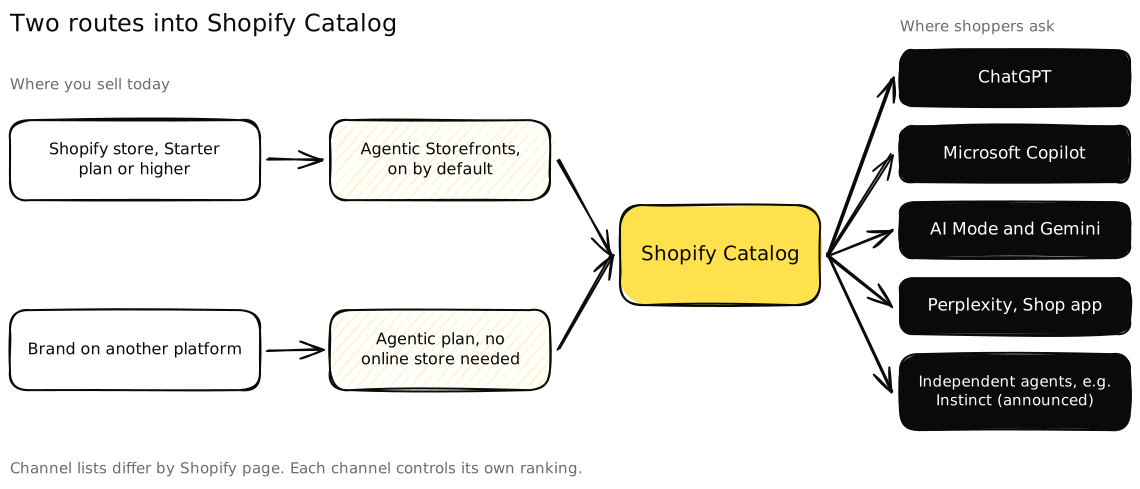 Both routes end in the same catalog, so the same data rules decide what agents see.
Route 1, you run a Shopify store. Agentic Storefronts are “active by default for eligible stores”. You manage which AI channels sell your products under Sales channels, then Agentic, in the Shopify admin. Shopify’s newsroom says there are no separate integrations, no apps and no transaction fees beyond standard processing rates.
Route 2, you sell on another platform. Shopify’s Agentic plan is built for this. Shopify says it lets you “syndicate your products to AI chats and let shoppers check out in conversations, no Shopify online store required.” The plan page lists no monthly fee, with card rates charged when products sell. It also says Shopify plugs into product information management (PIM) and tax systems, and that you can route orders to your existing order management system. A brand on another commerce platform, or a manufacturer selling through its own custom site, can join Shopify Catalog without moving its store.
The second route gets one line in most guides, but it changes the decision for brands not on Shopify. You can reach several AI channels through one catalog without replatforming.
Step 1: Confirm your store and products are eligible
Most “why am I not showing up” problems are eligibility problems. Shopify says products that meet the requirements are “automatically included in Shopify Catalog, and you don’t need to take any additional action”. The flip side is that products that miss a requirement drop out without an alert.
Shopify’s Catalog requirements work at two levels.
Store level:
- Comply with Shopify’s Terms of Service and Acceptable Use Policy.
- Be on the Starter plan or higher and not in private mode. Agentic plan stores are the exception.
- Verify your email address and turn on two step authentication.
- Show genuine sales history, fulfill orders promptly, keep chargebacks low and pay Shopify invoices on time.
Product level:
- A title and at least one product image.
- A price greater than zero.
- Published to the online store, Hydrogen or a headless channel, with an identifiable product URL.
- Not unlisted, and not hidden from search engines.
- No sensitive content in the images or description.
- On the Agentic plan, an external product URL if you don’t publish an online store.
Shopify also excludes whole categories. The list includes alcohol, tobacco and vaping, prescription and medical products, weapons, adult content, sexual health products, event tickets, live animals, services and add ons, and uncategorized products.
That last one catches a lot of stores. A product with no category assigned is out of the catalog even when everything else is perfect. So is a product someone hid from search engines years ago for an SEO reason that has nothing to do with AI.
Check it in 15 minutes: export your products and filter for missing images, a zero price, an empty category, an unlisted status and the “hide from search engines” setting. Then open Sales channels, then Agentic, and confirm the channels you want are switched on.
Step 2: Understand what decides which products get picked
Being in the catalog makes you eligible. It doesn’t make you the pick. Shopify is blunt about it. Inclusion “doesn’t guarantee that a product will appear in a specific AI answer, be ranked in a specific position, or be displayed by every channel,” and each channel “controls the final ranking, wording, and shopping experience.”
Shopify has published two lists of what goes into that ranking. In its June 18, 2026 guide to agentic commerce, Shopify writes that “ranking factors vary by AI platform but can include data quality, relevance, availability, pricing, and engagement signals.” Two days earlier, its Shopify Catalog explainer said agents decide based on “the buyer’s request, product data quality, availability, price, shipping, trust signals, and other factors.”
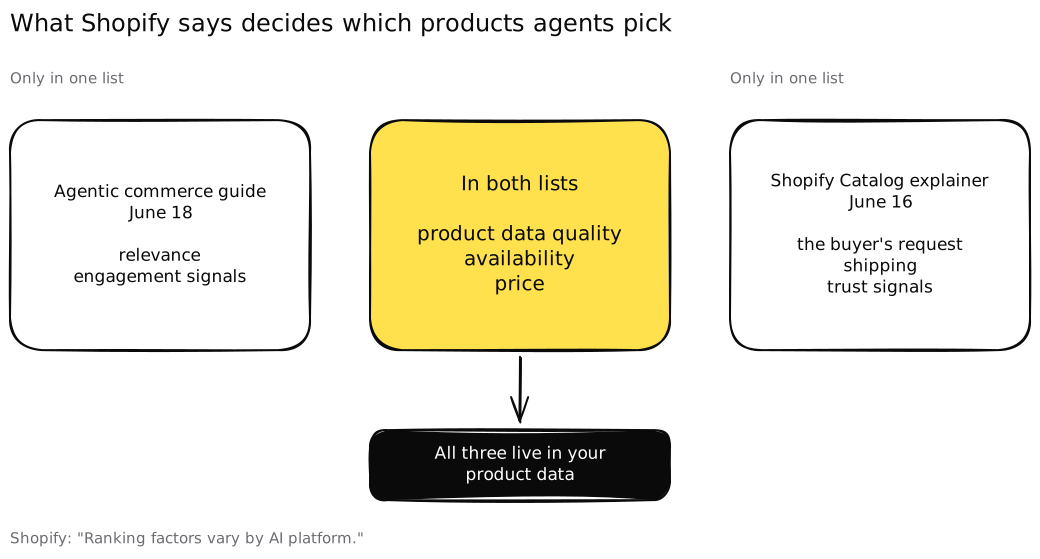 Three factors appear in both of Shopify’s lists, and all three live in your own product data.
Read side by side, the lists tell you where to spend effort.
- In both lists: product data quality, availability and price. These sit in your admin and your feed, so you control them fully.
- Relevance and the buyer’s request: whether your product actually matches what was asked. You influence it through titles, categories and attributes that use the words buyers use.
- Shipping: delivery cost and speed. An agent asked for “by Friday” can’t pick a product with no delivery promise.
- Engagement and trust signals: reviews, ratings, return rates and what the rest of the web says about you. This moves slowest, and you earn it instead of editing it.
Notice what’s not on either list. There’s no paid placement for merchants on Shopify’s merchant pages and no “AI optimized” badge to buy. Shopify’s developer docs do mention promoted placements that approved developers can run on their own agents for commission. That’s a program for agent builders, not a lever a merchant can pull.
Step 3: Clean the product data agents read
This is the work that moves the shared factors. Shopify’s optimization guidance names the fields that matter. They are title, description, images, product organization (type, vendor, collections and tags), barcode (ISBN, UPC, GTIN), variants including the option name, and the external product URL on the Agentic plan.
Its developer docs add a warning worth taking seriously. “Some fields might be inferred by Shopify’s AI and might not always be present or have varying accuracy.” If you leave the material or the fit blank, a model guesses. Fill it in yourself and nothing needs guessing.
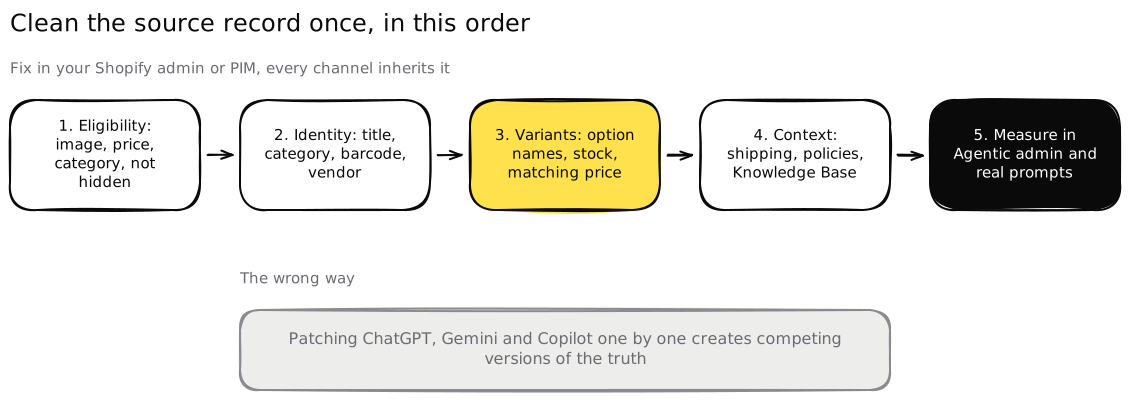 Fix the source record once and every AI channel inherits it. Patching each channel by hand creates competing versions of the truth.
Work through this feed cleaning checklist in order. Every item maps to a field Shopify names.
Identity: can an agent tell what the product is?
- Titles in buyer words. “Women’s waterproof trail running shoe” beats “Model X 24 FW.” Shopify’s Catalog explainer advises clear titles without keyword stuffing, so add a qualifier, don’t add five.
- A real category. Assign a product category on every item. Uncategorized products are excluded, and the category is how Shopify maps you to its taxonomy.
- Barcodes where they exist. Add the GTIN, UPC or ISBN. A barcode is a hard identifier an agent can match against other sources.
- Type, vendor and tags that mean something. These are named optimization fields. Use the vendor field for the brand, not your warehouse code.
Description: can it answer the buyer’s next question?
- Put the deciding facts first. Shopify’s explainer advises leading with the important facts and answering real buying questions. Cover material, dimensions, fit, compatibility and care in plain sentences.
- Map better sources if your descriptions are thin. Shopify’s mapping tool lets you feed the catalog’s title, description and category fields from product attributes, metafields or metaobject references, without changing what shoppers see on your store. If your best spec data sits in metafields, point the catalog at it.
Variants: is the exact thing in stock at that price?
- Name every option. “Size” and “Color,” not “Option 1.” The option name is a listed field, and agents filter on it.
- One image per variant where it differs. A shopper asking for green shouldn’t see a blue photo.
- Live inventory per variant. A sold out size that still reads as available becomes a failed order. Turn on inventory tracking for every variant.
- Prices that match everywhere. The price in the catalog, on the page and at checkout should be the same number, sale prices included.
Context: what happens after the click?
- Shipping and delivery shown early. Shipping is on Shopify’s factor list. State costs and delivery windows on the product page and in your shipping settings.
- Complete store policies. Shopify says complete, up to date policies help AI agents give correct information during conversations. That covers returns, refunds, shipping and contact details.
Check it in 10 minutes: pick three products, one simple, one with many variants and one on sale. Run each through Shopify’s free agentic readiness tool, which checks “your product page for the structured data that AI agents read to answer shoppers’ questions.” Then compare what it finds with the twelve items above.
Service, travel and booking businesses can’t list in Shopify Catalog, since services are excluded. The same discipline still applies to the feeds and pages they do control, with room types, rates and availability in place of sizes and stock.
Step 4: Answer shoppers’ questions with the Knowledge Base app
Agents don’t stop at “does it exist.” Shoppers ask follow up questions, such as whether a product can be returned or how long delivery takes, and the agent needs an answer it can trust.
Shopify’s answer is the Knowledge Base app. Its optimization guidance says the app lets you review and customize automatically generated facts about your store, review common questions shoppers ask, and write your own questions and answers about what makes your store different. The Agentic plan page pitches the same app to brands outside Shopify, as a way to see what buyers ask about your products and to answer on returns, shipping and more.
Treat the questions list as research. If shoppers keep asking an agent whether a jacket runs small, that belongs in the product description, the size guide and the app. Then the answer is consistent wherever the agent looks.
Step 5: Measure where you show up
Shopify gave Agentic Storefronts its own admin page in May 2026. According to the changelog, you can “track performance across all major AI channels, see which queries you rank for, and get recommendations to improve your product data.” Start there. The queries you rank for show where agents already see you as relevant, and the data recommendations feed straight back into Step 3.
Shopify’s numbers only cover Shopify’s channels, though, and they only cover products already in the catalog. Close the loop from the buyer’s side.
- Write 10 requests your buyers would give an AI, with real constraints such as a budget, a size, a deadline and a use case.
- Run each in ChatGPT, Copilot, Google’s AI Mode, Gemini and Perplexity.
- Log whether you appear, whether you’re the first pick, and whether the price and stock are right.
- Rerun the same list monthly. AI answers vary between runs, so trends matter more than single results.
Our guide to what an AI visibility audit should show you explains how to keep that measurement honest. If Perplexity matters for your category, our Perplexity shopping guide covers its own merchant program alongside the catalog route.
What does the Instinct and Shopify tie-up change?
It shows where Shopify Catalog is heading. The catalog isn’t only a pipe into the big assistants anymore. Personal agents that act for one person can search it too.
Based on what Instinct’s founder announced, Instinct reads Shopify’s merchant network for live prices, sizes and availability, then hands checkout to Shop Pay. Two things follow for merchants.
- Variant data is the product. An agent that books and buys for someone checks the exact size and stock before it commits. A catalog that’s only right at product level fails here.
- Checkout has to accept agents. On the same day, Shopify added WebMCP tools named
get_checkout,update_checkoutandcomplete_checkoutso browser based agents can finish a purchase with the buyer’s authorization, TechCrunch reported. The same report noted that Amazon and Adidas block agents from buying on users’ behalf. Whether to allow agents is your call, but make it a decision, not a side effect of a bot rule.
We don’t know how Instinct ranks Shopify products against each other, and Instinct hasn’t published it. The safe assumption is the one Shopify states for every channel. Clean data, live stock, fair prices and real engagement.
What changes for B2B brands?
Shopify Catalog reads like a consumer story, but plenty of B2B brands sell physical products. Office supplies, lab equipment, packaging, tools and spare parts all fit the catalog model. The rules are the same. Barcodes and clean option names matter even more in B2B, where a buyer often needs an exact part number and a quantity.
Software and service companies can’t list in Shopify Catalog, because services are excluded. They still go through the same three shared factors when a buyer asks an assistant for a vendor shortlist. Data quality means a public pricing page and a clear plan comparison. Availability means a trial or demo that starts without ten form fields. Price means a number the assistant can check against the buyer’s budget. Our guide to GEO for B2B walks through that side.
What not to do
Three shortcuts waste time.
- Don’t buy “guaranteed placement” in ChatGPT or any agent. Shopify says no inclusion guarantees a ranking, and each channel controls its own results. Anyone promising otherwise is selling something they don’t control.
- Don’t stuff titles. Shopify’s guidance warns against keyword stuffing in titles. A title packed with every synonym reads worse to a model than one clear description.
- Don’t fix one channel by hand. If ChatGPT shows the wrong price, the fix is your product record, not a one off override somewhere else.
The steps above are the work we do at Earleads for B2B and B2C brands, from eligibility and product data checks to the sources AI answers rely on. If you’d rather see where you stand first, our free AI visibility audit checks how ChatGPT, Gemini, Perplexity and AI Overviews answer your buyers’ questions and where your products drop out.
Frequently asked questions
How do I get my products into Shopify Catalog?
If you run a Shopify store on the Starter plan or higher, you mostly don't apply. Shopify's help center says products that meet the Catalog requirements are included automatically. That means a title, at least one image, a price above zero, a published product URL, and not being unlisted or hidden from search engines. Brands on other platforms add products through the Agentic plan.
Can I sell on ChatGPT through Shopify without a Shopify store?
Yes. Shopify's Agentic plan lets brands that don't use Shopify for their ecommerce add products to Shopify Catalog and sell across AI channels, with no Shopify online store required. Shopify's plan page says there's no monthly fee and you pay card rates when products sell. Products need an external product URL if you don't publish an online store.
Which AI channels does Shopify Catalog reach?
Shopify's help center lists ChatGPT, Google AI Mode and Gemini, Microsoft Copilot and Meta surfaces for Agentic Storefronts. Shopify's Agentic plan page also names Perplexity and the Shop app. Shopify's developer docs open the catalog to other agents too, and Instinct's founder announced in September 2026 that Instinct searches Shopify's merchant network.
Does being in Shopify Catalog guarantee AI agents will recommend my products?
No. Shopify says inclusion doesn't guarantee a product appears in a specific AI answer or ranks in a specific position, and that each channel controls the final ranking and wording. Inclusion makes you eligible. Clean product data, fair pricing, live stock and real buyer engagement decide whether an agent actually picks you.
Why are my Shopify products missing from AI shopping agents?
The usual causes are eligibility, not ranking. Check that the store isn't in private mode, that products aren't unlisted or hidden from search engines, that each has an image and a price above zero, and that the category isn't on Shopify's excluded list, which covers alcohol, tickets, services and uncategorized products. Then check Sales channels, then Agentic, in your admin.
Does Shopify Catalog matter for B2B brands?
It depends on what you sell. B2B brands selling physical products such as supplies, equipment or packaging face the same catalog rules as consumer brands. Service and software businesses can't list in Shopify Catalog, since Shopify excludes services, but they face the same test when buyers ask AI assistants for vendor shortlists, using pricing pages and review sites.