
GEO for B2B: When AI Agents Shortlist Vendors

Othmane Khadri · Founder, Earleads

Summary
GEO for B2B is the work of getting your company named when buying committees ask ChatGPT, Gemini, Claude or Perplexity for a vendor shortlist. It comes down to three jobs. Publish the facts a shortlist needs, get mentioned on the directories and communities AI reads, and connect AI-referred visits to your CRM so the pipeline shows up.
On this page
- What is GEO for B2B?
- What changes when AI agents shortlist vendors
- Step 1: Publish the facts a shortlist needs
- Step 2: Write honest comparison pages
- Step 3: Get mentioned where AI reads for your category
- Step 4: Let AI crawlers read the pages that matter
- Step 5: Connect AI-referred visits to the CRM and pipeline
- How Earleads runs the routing and attribution layer
- What changes for B2C brands
- Do you need a GEO agency for B2B SaaS?
What is GEO for B2B?
GEO for B2B is the work of getting your company named when buying committees ask AI assistants which vendors to consider. GEO stands for generative engine optimization. In B2B it means three jobs. Publish the facts a shortlist needs, get mentioned on the sites the answers read, and connect the visits AI sends you to your CRM so pipeline is visible.
The first two jobs overlap with what we cover in how to get cited by AI. This guide is about what’s specific to business buying. Several people are involved, each one asks AI a different question, the deal closes months after the first answer, and most of the visits AI sends you arrive without a name attached. If your B2B AI search work stops at “were we mentioned?”, it stops before the part your board cares about.
A quick note on who’s writing this. Earleads does GEO and the GTM engineering behind it, so we have a stake in the topic. We don’t name clients here or quote results, and nothing below is a promise of rankings. It’s the practice, step by step.
What changes when AI agents shortlist vendors
The shortlist used to start with a search, a few vendor sites and a colleague’s opinion. Now a growing share of it starts in a chat window.
G2 surveyed 1,076 B2B software buyers in March 2026. Half of them (51%) now start their research in an AI chatbot more often than in Google, and 71% rely on a chatbot at some point. More striking, 69% said they picked a different vendor than they’d planned because of what a chatbot told them, and one in three bought from a vendor they’d never heard of before (G2, April 2026).
Forrester sees the same shift from the buyer side. In its Buyers’ Journey Survey, 2025, 94% of business buyers used AI in their buying process, and “twice as many buyers … named generative AI or conversational search as a more meaningful or important source of information than any other source, far outpacing vendor websites, product experts, and sales” (Forrester, January 2026). The same post notes that 61% of business buyers use private AI tools their company gives them.
Three things follow for B2B teams.
Every committee member asks their own question. The person who’ll use the tool asks “best tool for X with a team of 50.” Finance asks “how much does X cost per seat?” Security asks “is X SOC 2 compliant?” IT asks “does X integrate with Salesforce?” One page can’t answer all four, and an answer that can’t confirm a fact tends to fall back on whatever third party page it finds.
You can be cut before anyone visits. A chatbot answer that leaves you off, or describes you wrong, removes you from the shortlist quietly. There’s no lost-deal reason in the CRM, because there was never a deal.
The visits that do arrive are hard to see. Some come with a clean referrer. Many land as direct traffic, or arrive later, when someone types your name after a conversation with an assistant. If nobody connects those visits to companies and deals, AI search looks like a cost with no return.
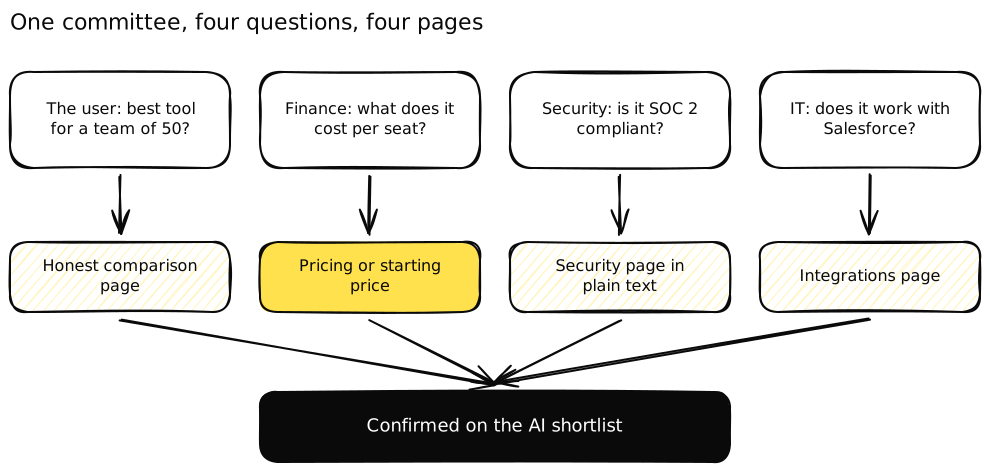 Four people, four questions, four pages. The shortlist is only as strong as the weakest answer.
Step 1: Publish the facts a shortlist needs
AI answers repeat facts they can confirm. The pages that confirm them for a B2B shortlist are usually the ones marketing teams treat as afterthoughts.
Pricing, or at least a starting price. If your pricing isn’t public, the answer to “how much does X cost” gets filled in by a directory listing, a two-year-old thread or a competitor’s comparison page. You don’t need to publish every enterprise discount. A starting price, the main things that move the price (seats, usage, modules) and what’s included in each plan give an answer something accurate to repeat. If every deal is custom, say how pricing works and what a typical scope includes.
Integrations. One page per major integration, or one page with a clear list, written in plain text. Say what syncs, in which direction and on which plan. “Integrates with HubSpot” is weak. “Syncs contacts and deals both ways with HubSpot on every plan” is something an assistant can quote back to someone in IT.
Security and compliance. A security page, or a trust page, that states in plain text which certifications you hold, where data is hosted, how access is controlled and how to request reports. If a certification is in progress, say so and give the expected date. Don’t let a badge image carry the claim alone, because text is what gets read.
Implementation and support. How long setup takes, who does it, what the customer needs to provide and what support looks like after go-live. Committees ask about risk, and this is the page that answers it.
Google gives the same advice for its own AI features in different words. It recommends “making sure your structured data matches the visible text on the page” and says a page must be “indexed and eligible to be shown in Google Search with a snippet” to appear as a supporting link (Google Search Central). Facts that sit only in a PDF, an image or a gated form don’t meet that bar.
Step 2: Write honest comparison pages
“X vs Y” and “alternatives to X” are where B2B shortlists get decided, and they’re the questions buyers ask AI most directly. If you don’t publish a comparison, the answer is built from pages written by your competitors and by affiliate sites.
The trap is writing comparisons that only a sales team could love. A page where you win every row reads as an ad, and answers tend to lean on other sources when the vendor’s own page is one-sided. Honest pages work better for people and for AI.
- Say who each product is best for, including when the other one is the better pick.
- Compare on the criteria buyers use, such as price model, integrations, setup time and limits, not only your strongest features.
- Check every claim about the competitor against their live pricing and docs, and date the page.
- Keep the comparison in a plain HTML table, not an image.
Start with the two or three comparisons your sales team hears most. If buyers keep asking “how are you different from [incumbent]?”, that page is overdue.
Step 3: Get mentioned where AI reads for your category
Your own pages confirm facts. Other people’s pages decide whether you’re on the list at all. Google describes its AI Overviews and AI Mode as using “a ‘query fan-out’ technique, issuing multiple related searches across subtopics and data sources” (Google Search Central), so an answer about your category is assembled from many sites, and most of them aren’t yours.
In B2B those sites fall into a few groups.
Review directories. For software, directories like G2 are read by machines more than by people now. G2 analysed 80,000+ product pages over 180 days and found that “80% of all products have more AI citations than pageviews” (G2, May 2026). That makes your listing a source document. Keep the category, description, pricing and integrations current, and ask happy customers for reviews that mention the use case and team size, because those details are what answers to constraint questions need. G2’s April survey also found review sites were the top signal that made buyers more confident in an AI recommendation.
Practitioner communities. Subreddits, Slack and Discord communities, forums and LinkedIn threads where people in your buyer’s role compare tools. Answers often cite these because they hold first-hand experience. The work is slow and has to be honest. Answer questions as a person with expertise, disclose who you work for, and don’t drop links where nobody asked.
Comparison articles and newsletters. The roundups and “best tools for X” pieces written by practitioners and industry publications. Find the ones cited for your buyer questions, then pitch real data, a customer willing to talk or an expert quote.
Partner and marketplace pages. Integration marketplaces, partner directories and cloud marketplace listings are frequently the source an answer uses to confirm “does it work with X?”.
The way to pick where to start is to look, not guess. Run your buyer questions, open the cited links and list the pages that appear again and again. Our guide on what an AI visibility audit should show you walks through building that citation map.
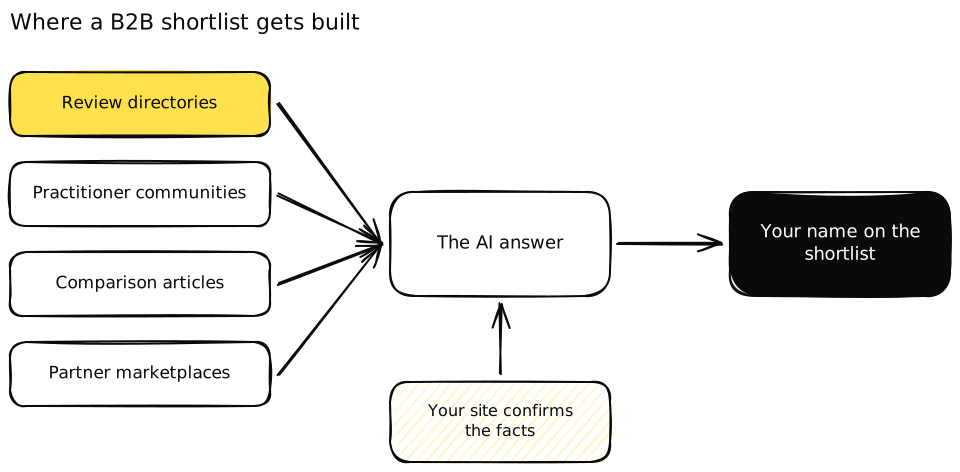 Other people’s pages put you on the list. Your own pages confirm what the list says about you.
Step 4: Let AI crawlers read the pages that matter
None of the above helps if the crawlers behind AI answers can’t fetch your pages. This is a short check, and it’s often where B2B sites fail, because security teams lock down bots without knowing which ones matter.
OpenAI says “OAI-SearchBot is used to surface websites in search results in ChatGPT’s search features” and that sites opted out of it “will not be shown in ChatGPT search answers, though can still appear as navigational links” (OpenAI, bots). GPTBot, used for training, is a separate decision. Blocking training and allowing search is a valid policy. Blocking both by accident isn’t.
Check three things on your pricing, integrations, security and comparison pages:
- Your robots.txt allows the search crawlers you want, such as OAI-SearchBot and PerplexityBot.
- Your CDN or firewall doesn’t block or challenge them anyway. Test what a bot actually receives.
- The key facts are in the HTML, not loaded by JavaScript after the page renders or hidden behind a login or form.
We go deeper on the crawler side in how to get ChatGPT to recommend your business.
Step 5: Connect AI-referred visits to the CRM and pipeline
This is the step most B2B GEO plans skip, and it’s the one that decides whether the work keeps its budget. A citation isn’t pipeline. A visit from an identified company, routed to an owner, recorded on a deal, is.
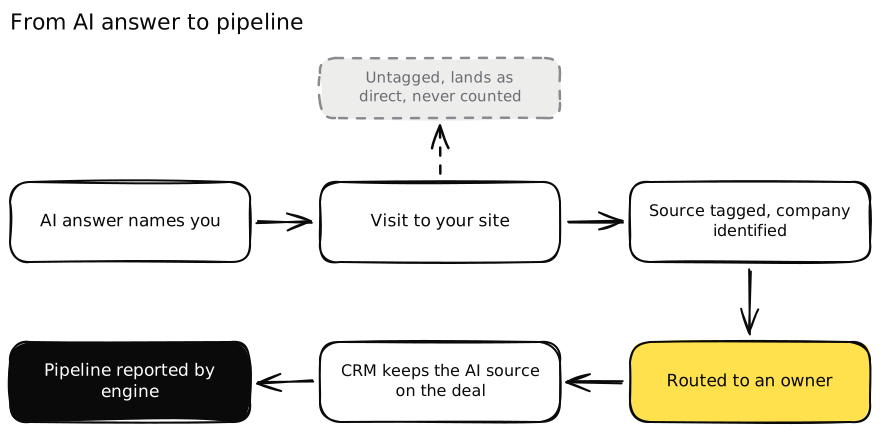 Most AI-referred visits die in the “direct” bucket. The yellow box is where the routing layer earns its keep.
Tag the source
Start with what the platforms give you. ChatGPT adds utm_source=chatgpt.com to the links it sends from search, according to OpenAI’s publishers and developers FAQ. Perplexity, Gemini, Claude and Copilot visits usually carry a referrer you can group into one AI channel in your analytics.
Google is different. It says sites in AI features are “included in the overall search traffic in Search Console” (Google Search Central). There’s no separate AI Overviews line, so treat any number labelled “AI Overview traffic” with care unless someone explains how it was separated.
CRMs are catching up. HubSpot now records “AI Referrals” as a traffic source, with the AI platform domain (chatgpt.com, claude.ai and so on) as the first drill-down and the utm_campaign as the second (HubSpot Knowledge Base). If you’re on another CRM, create the same fields yourself and fill them from the first-touch referrer.
Identify the company
Most B2B visitors never fill a form on the first visit. A company-level identification tool can match some anonymous visits to the company behind them, within the limits of privacy law and your own consent setup. You won’t get every visit, and you shouldn’t pretend to. But an AI-referred visit from a company that fits your ICP, landing on the pricing page, is one of the strongest buying signals you’ll see all month.
Add one more source for the visits you can’t tag. Put a “How did you hear about us?” field on demo and contact forms with an option for ChatGPT or another AI assistant, and ask the same question on first calls. Self-reported answers catch the buyer who read a chat answer on Monday and typed your URL on Thursday.
Route it to an owner
An identified visit that sits in a dashboard is a missed meeting. Decide in advance what happens.
- An existing open deal gets a note and an alert to the account owner.
- A target account with no deal goes to the assigned rep or SDR with the page visited and the source.
- A good-fit company not in your target list gets created, enriched and assigned by your normal territory rules.
- A poor fit gets logged and left alone.
Keep the AI source on the contact, the company and any deal created afterwards. That’s what lets you report pipeline by engine three months from now.
Report by stage, not by mention
Report AI search as a chain, with each link kept separate. How often you’re named for your buyer questions, how many visits each engine sends, how many of those become identified companies, how many reach an owner, and how much pipeline and revenue carries the AI source. When one link is weak, you know where to work.
How Earleads runs the routing and attribution layer
This is how we set up the step above in practice, without client details.
We start from the buyer questions a client approves, never from prompts with their brand name in them, and map which sites the answers cite. That map decides the publishing and mention work in Steps 1 to 3.
On the pipeline side we connect three things the client already owns. The analytics source tags, a company identification layer on the site, and the CRM. Identified visits from AI sources get matched against the CRM, enriched, scored against the ICP and routed by the client’s own rules, with the AI source written onto the record. Nothing is sent to a prospect automatically. The account owner decides what to do with each alert.
The reporting then follows the chain from Step 5, by engine. The data and the setup stay in the client’s own tools, so they keep it if we stop working together. For a different angle on the same plumbing for autonomous agents, see AI agent optimization.
What changes for B2C brands
The structure is the same, but the weights move. B2C buyers ask for products with constraints, such as “best running shoes for flat feet under $120,” and there’s usually one decision maker, not a committee. Product data, price, stock, reviews and videos matter more than security pages and integration docs. The pipeline step becomes AI-referred sessions tied to accounts created and orders, rather than identified companies and deals. If you sell to consumers, our guide on whether your store is visible to AI shopping agents covers the product side.
Do you need a GEO agency for B2B SaaS?
Not necessarily. The work above needs three skills. Someone who can publish and fix pages fast, someone who can earn mentions in directories and communities without spamming them, and someone who owns the CRM and its routing rules. Many B2B SaaS teams already have all three people. What they often lack is one owner who connects the work to pipeline.
An agency is worth it when nobody internal owns that chain, when the off-site work needs more hands than you have, or when you want the measurement and routing built once and handed over. Whoever you pick, ask how they’ll link a citation to a deal before you ask how many articles they’ll write. Our guide on how to choose a GEO agency has the full list of questions.
If you want to see where you stand first, our free AI visibility audit maps the 5 conversion queries competitors are winning in 7 days, shows who wins each one on every engine, and lists the exact pages and threads the answers read.
Frequently asked questions
What is GEO for B2B?
GEO for B2B, or generative engine optimization for B2B, is the work of getting your company named and cited when business buyers ask AI assistants for vendor shortlists, comparisons and answers to due diligence questions. It covers what you publish on your own site, where you're mentioned on other sites, and how you connect the visits AI sends you to pipeline in your CRM.
How is B2B GEO different from B2C GEO?
B2B purchases involve several people, each asking AI different questions, and the sale closes weeks or months after the first answer. So B2B GEO puts more weight on pricing, integration and security pages, on review directories and practitioner communities, and on tying identified companies to pipeline. B2C GEO leans harder on product data, reviews, videos and orders.
Should B2B companies publish pricing for AI search?
If you can, yes, at least a starting price or the way pricing is calculated. When pricing isn't public, AI answers fill the gap with whatever a directory or a thread says, which may be wrong or years old. A clear starting price, the main pricing drivers and what's included lets an answer repeat accurate facts. Fully custom deals can still say how pricing works.
Which sites matter most for B2B AI search?
It depends on your category, so check which pages the answers to your buyer questions cite. For software, review directories like G2 show up often, and G2's own analysis of 80,000+ product pages found 80% get more AI citations than human pageviews. Practitioner communities, industry newsletters and comparison articles written by people who use the tools usually come next.
How do you track AI referrals in a B2B CRM?
Start with the referrer. ChatGPT adds utm_source=chatgpt.com to links it sends, and HubSpot now records an AI Referrals traffic source with the AI platform as a drill-down. Then make sure identified visits and form fills carry that source onto the contact and the company, get routed to an owner, and stay attached to any deal created later.
Do you need a GEO agency for B2B SaaS?
Not always. A team with an SEO lead, someone who can earn mentions in communities and a RevOps person who owns the CRM can run GEO in house. An agency helps when nobody owns all three, when you need the off-site work done at volume, or when you want the measurement and routing built once and handed over. Ask any agency to show how it links citations to pipeline.