
How to Get ChatGPT to Recommend Your Business

Othmane Khadri · Founder, Earleads
Summary
To get ChatGPT to recommend your business, make sure OAI-SearchBot can crawl your site, describe your business the same way on every source that mentions you, publish pages that answer buyer questions directly, and earn mentions in the roundups and threads ChatGPT reads. Then track a fixed list of buyer prompts every month.
On this page
- How does ChatGPT decide which businesses to recommend?
- Memory vs live search: two ways into a ChatGPT answer
- Step 1: Let OAI-SearchBot crawl your site
- Step 2: Describe your business the same way everywhere
- Step 3: Publish pages that answer buyer questions directly
- Step 4: Earn mentions in the roundups and threads ChatGPT reads
- Step 5: Measure on a fixed prompt list
- What changes for B2B and B2C businesses
- What doesn’t work
- How long does it take to get recommended by ChatGPT?
How does ChatGPT decide which businesses to recommend?
ChatGPT doesn’t take submissions, and there’s no form that adds your business to its list. It recommends the businesses it can describe with confidence, and that confidence comes from two places OpenAI documents in public.
The first is what the model already knows. OpenAI’s own help page on shopping results lists “model responses generated by ChatGPT before it considers any new search results” as one of the inputs. In plain terms, the picture of your category that the model learned in training shapes the answer before any search happens.
The second is live search. According to OpenAI’s search help page, ChatGPT “may search the web automatically when your question would benefit from current information.” When it does, it often rewrites the question into one or more targeted queries, sends them to partner search providers, and reads the pages that come back. The page links the privacy policies of Microsoft and Shopify as two of those providers. For local questions it also uses an approximate location based on your IP address.
So when someone asks “what’s the best accounting software for a 20 person agency” or “good vegan restaurant near me for a birthday,” two things decide whether your name comes up. Does the model already associate you with that need, and can the search step find a page that confirms it?
One thing doesn’t decide it, and that’s money. OpenAI began testing ads in ChatGPT on February 9, 2026, but its ads FAQ says “Ads do not influence ChatGPT’s answers” and that advertisers “have no ability to shape, rank, or alter ChatGPT’s responses.” Product results in shopping answers are “selected independently by ChatGPT and are not ads.” Any ad you buy sits below the answer with a sponsored label. Getting ChatGPT to recommend your business, inside the answer, is earned work.
Memory vs live search: two ways into a ChatGPT answer
Most advice on how to rank in ChatGPT blurs these two inputs together. They behave differently, so it’s worth splitting them before you pick what to fix.
| What the model already knows | What ChatGPT search finds | |
|---|---|---|
| Where it comes from | Training data, collected before the model shipped | Pages fetched at question time through search partners and OAI-SearchBot |
| How fast it changes | Slowly, with new model versions | As fast as pages get crawled and indexed |
| What you control | Indirectly, through how often and how consistently the web describes you | Directly, through crawler access and the pages you publish |
| OpenAI crawler involved | GPTBot | OAI-SearchBot |
| Where it shows | Answers with no citations, and the starting shortlist in searched answers | Cited answers with links, product results, local results |
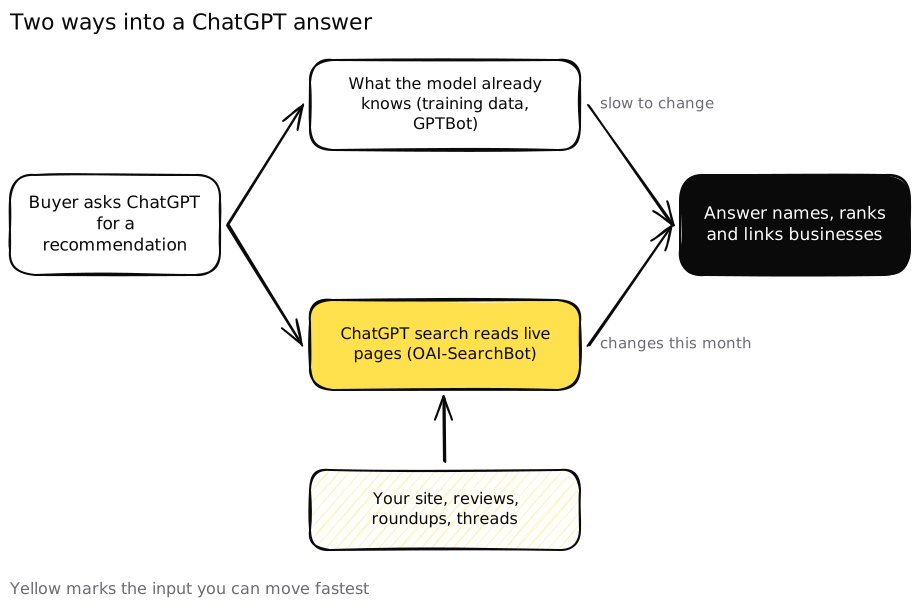 ChatGPT blends what it already believes with what it finds on the live web, so you need to be present in both.
Our view is that live search is where most businesses should start, because it’s the input you can move this month. Memory follows from the same work, just more slowly. The five steps below cover both.
Step 1: Let OAI-SearchBot crawl your site
If you want to show up in ChatGPT search, the first check takes five minutes and catches more businesses than you’d expect. OpenAI runs three different bots, and they do three different jobs, according to its crawler documentation.
- OAI-SearchBot is “used to surface websites in search results in ChatGPT’s search features.” Sites that block it “will not be shown in ChatGPT search answers, though can still appear as navigational links.”
- GPTBot crawls content “that may be used in training our generative AI foundation models.”
- ChatGPT-User fetches pages when a person asks ChatGPT to do something, and OpenAI says it “is not used for crawling the web in an automatic fashion.”
That means blocking OAI-SearchBot removes you from cited ChatGPT search answers, while blocking GPTBot only affects training. OpenAI’s publisher FAQ puts it plainly. “Any public website can appear in ChatGPT search,” and for your content to appear in summaries and snippets you need to “make sure you aren’t blocking OAI-SearchBot.”
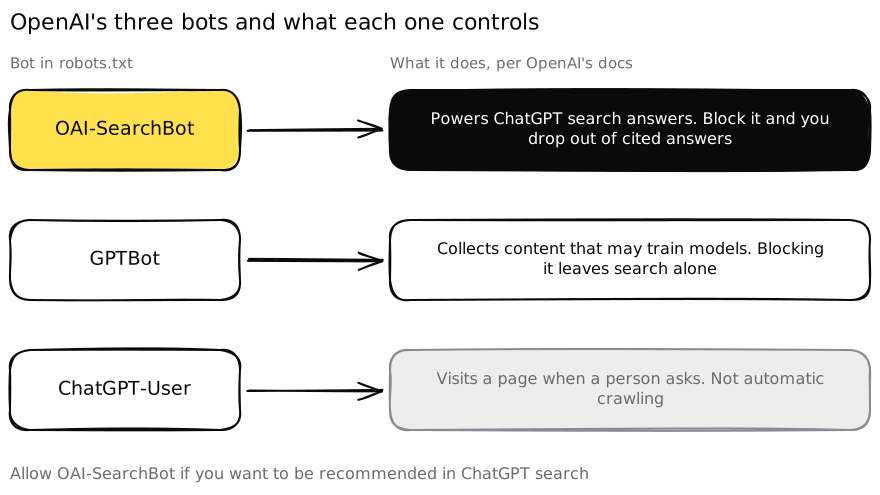 Blocking the wrong bot is the fastest way to disappear from ChatGPT search. OAI-SearchBot is the one that decides it.
A robots.txt that allows search but opts out of training looks like this.
User-agent: OAI-SearchBot
Allow: /

User-agent: GPTBot
Disallow: /
Whether you also block GPTBot is a business call. Our take is that most businesses that want to be recommended should leave it open, since the training data is where the model forms its first impression of your category. Publishers protecting paid content often decide differently, and that’s a fair trade.
Then check the places robots.txt doesn’t cover.
- Your CDN or firewall. Bot protection rules can block OpenAI’s crawlers even when robots.txt allows them. Ask whoever runs your hosting to confirm OAI-SearchBot isn’t challenged or rate limited.
- Pages hidden behind scripts. If your prices, menus or service details only appear after JavaScript runs, check that the text is in the HTML a crawler receives.
- Noindex tags. OpenAI notes that a disallowed URL can still show up as a bare link and title if it learns about it elsewhere, and that the noindex meta tag is the way to keep it out. That cuts both ways, so make sure no important page carries a leftover noindex.
- Timing. OpenAI says it takes “~24 hours from a site’s robots.txt update” for its systems to adjust.
If you sell online, this is also where you check what an AI shopping agent sees. We walk through that in Is your store visible to AI shopping agents?
Step 2: Describe your business the same way everywhere
ChatGPT recommends what it can describe confidently, and confidence comes from agreement. When your website, your review profiles, your directory listings and the articles that mention you all say the same thing about what you do, for whom and at what price point, the model has one clear story to repeat. When they disagree, it has four half stories and tends to name a competitor whose story is cleaner.
Start with one sentence. It should say what you sell, who it’s for and what makes you different, in the words your buyers use. For a B2B company that might be “payroll software for European startups with 10 to 200 employees.” For a B2C business it might be “a family run Italian restaurant in Lyon’s 6th arrondissement, open until midnight, with a full vegan menu.”
Then put that sentence, word for word, in every place you control.
- Your homepage, about page and footer.
- Google Business Profile, Apple Business Connect and Bing Places for local businesses.
- G2, Capterra, Trustpilot, Tripadvisor or whichever review sites your buyers trust.
- LinkedIn, Instagram and the other social profiles you keep active.
- Partner pages, marketplace listings and press kits.
Add Organization structured data to your homepage with the same name, description and sameAs links to those profiles. Google says this markup helps it disambiguate your organization. OpenAI hasn’t said it reads it, so treat it as tidy housekeeping that costs little rather than a ChatGPT switch.
Facts matter as much as wording. Opening hours, prices, locations, plan names and integrations should match everywhere. OpenAI’s own help page warns users that “search results and citations can be incomplete, outdated, or incorrect,” so a stale price on an old directory listing can end up in an answer about you.
Step 3: Publish pages that answer buyer questions directly
When ChatGPT searches, it rewrites the question into tighter queries. OpenAI’s example turns a broad question about cancer drugs into “CCR8 immunotherapy drug development 2025.” Your buyers’ questions get the same treatment. “Which CRM should a 15 person real estate team use” becomes something like “best CRM for small real estate teams pricing.” The pages that get read are the ones that answer that rewritten query in their first lines.
So for each question your buyers ask before they choose, publish a page that answers it directly. The questions are usually some version of these.
- What does it cost, and what’s included?
- Who is it for, and who should pick something else?
- How does it compare with the two or three alternatives people name?
- Does it work with the tools or situation I already have?
- What do other customers say about it?
Write the answer first, in 40 to 60 words, then the detail. Put numbers in plain text, not only inside images or PDFs. Name your business in each section, because ChatGPT quotes passages, not pages, and a paragraph that says “our solution is ideal for this” loses its meaning once it’s lifted out on its own.
Comparison pages earn their keep here. A fair page that says when a competitor is the better choice reads as trustworthy to a person and gives the model a clear “best for” statement to reuse. A page that claims you win on every row gives it nothing it can trust.
If you’re not sure which questions to cover, list the ones your sales team or front desk hears every week. Those are the prompts people type into ChatGPT, and an AI visibility audit should start from them too.
Step 4: Earn mentions in the roundups and threads ChatGPT reads
Your own site can confirm a recommendation. It rarely starts one. ChatGPT’s shopping help page says product results draw on structured metadata “and other third-party content,” and that review summaries come “from public websites.” For non shopping answers, the cited sources make the same point every time you look. The model leans on what other people say about you.
The fastest way to find those sources is to ask ChatGPT. Take five of your buyer questions, run them with search on, and open the Sources panel under each answer. You’ll usually see the same handful of page types again and again.
- “Best X for Y” roundups and comparison articles.
- Review platforms, from G2 and Capterra to Tripadvisor and Google reviews.
- Reddit threads and niche forums where people ask for recommendations.
- Industry publications, local press and newsletters.
- Directories and marketplaces specific to your category.
Then work the list. Ask the authors of roundups that leave you out whether they’d consider you, and give them the facts they need to judge fairly. Ask happy customers for reviews on the platforms that keep showing up, not just the one you prefer. Answer real questions in the threads where your buyers ask for help, as a person who knows the subject, and mention your business only where it genuinely fits.
Two warnings from doing this work. Paid placements in roundups tend to read as paid, and a page stuffed with affiliate links rarely becomes a source models trust. And community threads punish pitching fast. A useful answer from a named expert travels further than any promo post.
The same work helps with AI agents that book and buy, which we cover in how to get recommended by AI agents like Instinct.
Step 5: Measure on a fixed prompt list
You can’t log into a ChatGPT dashboard to see where you rank, because no such dashboard exists for businesses. Measurement has to come from the outside, and it only means something if the questions stay the same from month to month.
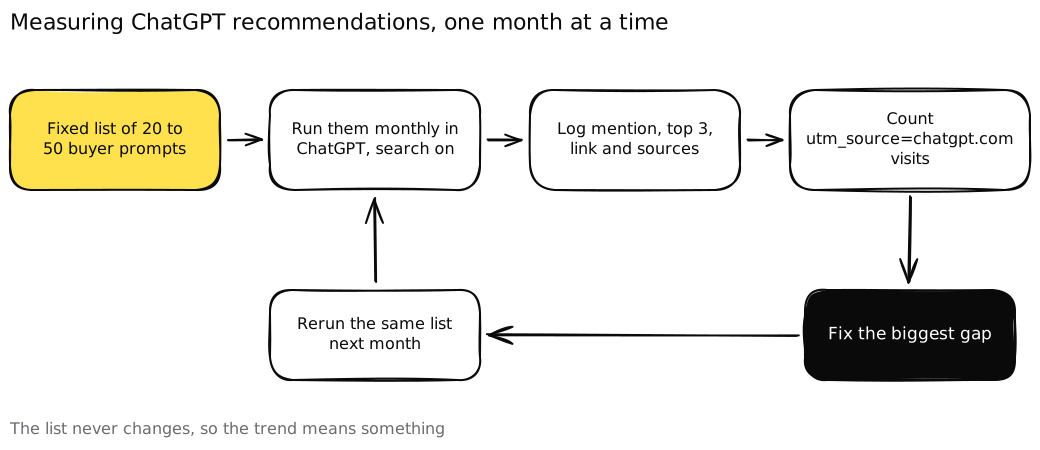 Keep the prompt list fixed. If the questions change every month, so does the score, and you learn nothing.
- Write 20 to 50 buyer prompts. Use your buyers’ words and real constraints like budget, team size, location or timing. Get sales or customer service to approve them, so you’re testing what people actually ask and not what flatters you.
- Run them monthly in ChatGPT with search on. Use a logged out or fresh session so memory doesn’t skew results, and set the location when the question is local.
- Log four things per prompt. Were you mentioned, were you recommended first or in the top three, were you linked, and which sources were cited.
- Track referrals. OpenAI says “ChatGPT automatically includes the UTM parameter utm_source=chatgpt.com in referral URLs.” Filter your analytics by that source to count sessions, sign ups, bookings and sales.
- Fix the biggest gap, then rerun. If you’re missing because a cited roundup leaves you out, that’s a Step 4 job. If ChatGPT cites a competitor’s comparison page, that’s Step 3.
Answers vary between runs, so run each prompt two or three times and record the majority result. Read trends over a quarter, not single months. And remember that referrals undercount, since many people read a recommendation and then search your name directly.
What changes for B2B and B2C businesses
The five steps are the same on both sides. What changes is which data ChatGPT can check.
Local and consumer businesses. ChatGPT uses approximate location for local questions, and the search help page says it can show restaurant reservation times from OpenTable, Resy or Yelp. A restaurant missing from those platforms, or listed with old hours, is harder to recommend for “a table for four tonight.” The same logic applies to clinics, gyms, salons and trades. Keep your listings, hours and reviews current on the platforms people book through.
Ecommerce. ChatGPT’s shopping results lean on “structured metadata from first-party and third-party providers (e.g., price, product description),” and OpenAI says merchants are ranked on “availability, price, quality, and whether they are the maker or primary seller of that item.” For Shopify merchants, OpenAI says product data is already integrated through Shopify Catalog and “no additional work is required.” Other merchants can apply for a direct product feed through OpenAI’s commerce docs. Either way, clean variants, accurate prices and honest stock status do more than another blog post.
B2B. Your website is your product feed. A buyer asking ChatGPT for “three project management tools with per seat pricing under $15” can’t get you in the answer if your price hides behind a demo form. Publish starting prices or the factors that set them, a real integrations page, security and compliance pages, and honest comparison pages. Keep your G2 or Capterra profile in the same words as your homepage.
What doesn’t work
A lot of ChatGPT SEO advice is guesswork sold as a system. A few things to skip.
- Buying your way into the answer. OpenAI says ads don’t influence answers. Ads can still be worth testing, but they’re a separate channel with a sponsored label.
- Blocking OAI-SearchBot by accident and writing more content. No amount of content helps if the search crawler can’t read it.
- Writing for the bot. Pages stuffed with “best” and “top rated” claims, with no prices, names or specifics, give the model nothing it can verify.
- Mass posting on Reddit. Thin promo comments get removed and downvoted, and they make your brand look worse in the threads that rank.
- Anyone promising a guaranteed recommendation. Nobody outside OpenAI controls what ChatGPT says. A good partner improves the inputs and shows you the prompt list moving. If you’re comparing partners, our guide on how to choose a GEO agency lists the questions to ask.
How long does it take to get recommended by ChatGPT?
Each input moves at its own speed. Crawler fixes take about a day to register, by OpenAI’s own figure. A new answer page can start appearing in searched answers once it’s crawled and indexed, often within weeks. New mentions in roundups and threads help as soon as ChatGPT search reads those pages. Shifting what the model believes without searching is slowest, because it waits on new model versions and on many sources repeating the same facts.
That’s why the order matters. Fix access first, then consistency, then pages, then mentions, and measure the whole time. If you’d like an outside read on where you stand today, our free AI visibility audit runs your buyer prompts through ChatGPT and the other major assistants and shows which of these steps to fix first. It’s the same work we do at Earleads for B2B and B2C brands, and it builds on the wider practice of AI agent optimization as assistants move from answering to acting.
Frequently asked questions
Can I pay to get ChatGPT to recommend my business?
Not in the answer itself. OpenAI started testing ads in ChatGPT in the US on February 9, 2026, for Free and Go users, but it says ads run on separate systems and that advertisers have no ability to shape, rank or alter ChatGPT's responses. Ads sit below the answer, labeled as sponsored. The recommendation in the answer has to be earned.
What is OAI-SearchBot?
OAI-SearchBot is the crawler OpenAI uses to surface websites in ChatGPT's search features. If your robots.txt blocks it, OpenAI says your pages won't be shown in ChatGPT search answers, although they can still appear as plain navigational links. It's separate from GPTBot, which crawls content that may be used to train OpenAI's models.
Should I block GPTBot if I want ChatGPT to recommend my business?
That's a separate choice from search visibility. GPTBot collects content that may be used for training, while OAI-SearchBot powers ChatGPT search. You can allow OAI-SearchBot and block GPTBot in robots.txt. Keep in mind that ChatGPT also draws on what the model already knows, so opting out of training can reduce how familiar the model is with you over time.
How do I know if ChatGPT is sending me traffic?
OpenAI says ChatGPT automatically adds utm_source=chatgpt.com to links it sends people to from search results. Filter your analytics by that source to see sessions, leads and sales from ChatGPT. Track it next to a fixed list of buyer prompts you test by hand, because many people read the recommendation and never click.
How long does it take for ChatGPT to start recommending a business?
It depends on which input you change. OpenAI says robots.txt changes take about 24 hours to apply. A new page can appear in answers that search the live web once it's crawled. Changing what the model already believes about your business takes longest, because it relies on many independent sources describing you the same way.
Does this work for local and B2C businesses, or only B2B?
It works for both. ChatGPT uses approximate location for local questions and can show restaurant availability from OpenTable, Resy or Yelp. Shoppers see product results built from structured product data and public reviews. B2B buyers ask for vendor shortlists, so public pricing, integrations and comparison pages do the same job a product feed does for a store.