Perplexity Shopping: How Brands Get Recommended

Othmane Khadri · Founder, Earleads
Summary
Perplexity shopping recommends products the way its answer engine ranks sources, by authority and relevance, and its help center says it favors merchants with deeper product details like availability, reviews, pricing and specs. Brands get in through the free Merchant Program, PayPal's store sync or a platform integration, and US shoppers can check out in chat with Instant Buy.
On this page
- What is Perplexity shopping?
- How Perplexity shopping got here
- How Perplexity picks the products it recommends
- Instant Buy with PayPal: what changes for merchants
- The Merchant Program: what Perplexity says it does
- Three ways into Perplexity’s product data
- Step 1: Let Perplexity’s crawlers in
- Step 2: Choose your entry route
- Step 3: Make every product card worth recommending
- Step 4: Get your checkout ready for Instant Buy
- Step 5: Build authority beyond your own pages
- Step 6: Measure Perplexity referrals and sales
- What about B2B brands?
- What not to believe about Perplexity shopping
- Where to start
What is Perplexity shopping?
Perplexity shopping is the product search and checkout layer inside Perplexity’s answer engine. A shopper asks a question like “sofas under $500” or “best skincare for sensitive skin as a gift,” and Perplexity answers with written advice plus product cards showing price, details and a summary of reviews. On eligible products, US shoppers can buy without leaving the chat through Instant Buy, which runs on PayPal.
That makes Perplexity a place where a buying decision can start and finish in one window. For brands, the question is simple. When someone asks for your category, does your product make the card, and if it does, can they buy it?
The feature has changed a lot in two years, which is why most guides contradict each other. This one sticks to what Perplexity, PayPal and Shopify say on their own pages, dated where it matters, and ends with a setup checklist you can work through.
If you sell across several AI assistants, read it next to our broader readiness check for AI shopping agents. This article goes deep on Perplexity alone.
How Perplexity shopping got here
Three launches stack on top of each other, and old articles often describe the first one as if it were current.
The 2024 launch: Buy with Pro. Perplexity’s Shop like a Pro announcement, covered by Fortune in November 2024, introduced product cards, a visual search called Snap to Shop, and a one click checkout called Buy with Pro for Perplexity Pro subscribers in the US, “for select products from select merchants.” If Buy with Pro wasn’t available, Perplexity sent the shopper to the merchant’s site. The same post launched the Merchant Program.
October 2025: PayPal store sync. PayPal announced agentic commerce services, including “store sync,” which makes a merchant’s product data discoverable in AI channels, with Perplexity named as one of them. Store sync runs through partners PayPal lists as Wix, Cymbio, Commerce (BigCommerce and Feedonomics) and Shopware.
November 2025: Instant Buy. On November 25, 2025, PayPal and Perplexity launched Instant Buy, letting US users go from research to purchase inside Perplexity. Perplexity’s own post, Shopping That Puts You First, says the new experience is “available for free to all US Perplexity users,” so checkout is no longer a Pro perk.
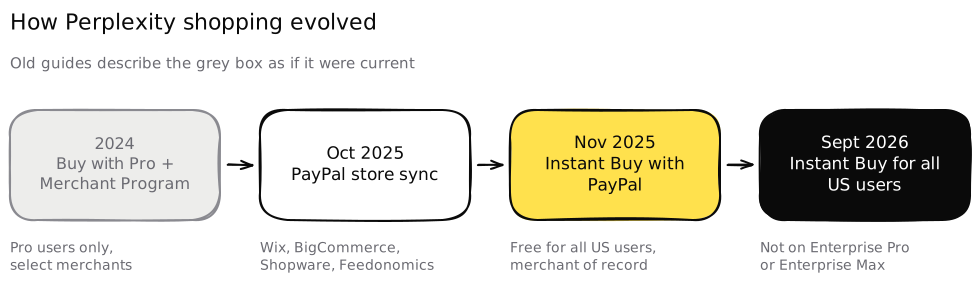 Advice written about Buy with Pro describes a Pro only checkout that Instant Buy has since opened to every US user.
Perplexity keeps its help center current. The What is Instant Buy? page was last modified on September 3, 2026, and it’s the best single source on how the feature works today.
How Perplexity picks the products it recommends
Perplexity hasn’t published a ranking algorithm. It has said more than most AI companies, though, and all of it sits on its own pages.
Its help center gives three inputs:
- Authority and relevance. “Just as our answer engine ranks sources based on authority and relevance, we rank product listings using similar criteria.”
- The shopper’s history. Perplexity uses “past searches, interactions, and saved preferences” to refine recommendations. The Shopping That Puts You First post gives an example, where a shopper who’s been browsing minimalist running shoes gets simpler options when they shop for a bag.
- Depth of product data. “Our answer engine is more likely to recommend merchants who provide deeper product details such as availability, reviews, pricing, and specifications.”
And one thing that doesn’t count. “Advertisers cannot pay to list their products,” the help center says, and product listings are decided “based on relevance and ratings.” The 2024 post said the same about product cards, which “aren’t sponsored.”
What this means in practice. You can’t buy your way onto a Perplexity product card, and you can’t control the personal history part. What you can control is the depth of the data Perplexity holds about your products, and how much authority your brand has across the sources Perplexity already trusts. That second part is classic GEO work, the same source work we cover in how to get cited by AI.
The help center also hints at how specific shoppers get. Its example queries include a price cap (“Sofas under $500”), a use case (“for sensitive skin as a gift”) and a quality tier (“Premium silk sheets”). A product page that never states a price, a skin type or a thread count gives the engine nothing to match.
Instant Buy with PayPal: what changes for merchants
Instant Buy is the in chat checkout. Perplexity’s help center describes three steps. The shopper searches, clicks Instant Buy and fills in details once, then “your order and payment are securely sent directly to the merchant for fulfillment.”
Four details matter if you sell products.
- You stay the merchant of record. Perplexity’s post says retailers “have full visibility into who their customer is, can process returns, build loyalty, and own the post-purchase relationship.” PayPal’s release says the same, and adds that PayPal’s fraud screening covers the transactions.
- Not every merchant is eligible. Perplexity “only support[s] Instant Buy with merchants who are compatible with our agentic checkout experience.” If you aren’t compatible, shoppers can still find your product but need to finish on your site.
- Customer service stays with you. The help center tells shoppers to contact the brand or retailer about availability, shipping, prices and delivery, and says Perplexity Support can’t answer product questions. Your support team will get these tickets.
- It’s US only for now. The help center says the service is “currently available to all users in the United States,” and not to Enterprise Pro or Enterprise Max users.
Who’s in? PayPal’s launch named Abercrombie & Fitch, Ashley Furniture, Fabletics, Adorama and Newegg. Perplexity’s Instant Buy + Buy with PayPal page adds Wayfair and “thousands of other merchants on BigCommerce, Shopware, and Wix platforms.”
That list tells you something useful. Platform integrations, not one off deals, are how most merchants reach Instant Buy.
The Merchant Program: what Perplexity says it does
The Perplexity Merchant Program is a free way for retailers to share product data directly with Perplexity. The 2024 announcement says it exists “to make it easy for large retailers to share their product specs with us,” and that it’s “distinct from and unrelated to Perplexity’s new sponsored questions ad products.”
Perplexity lists four benefits:
| Benefit | What Perplexity says | What it means for you |
|---|---|---|
| Recommendations | “Increased chances of being a ‘recommended product’” because products are in the index with “more robust details” | Richer data helps Perplexity judge quality and relevance |
| Payments | “Payment integrations” for one click checkout | Written for Buy with Pro in 2024; Instant Buy now runs on PayPal |
| API | “Free API access” to build Perplexity powered search, limited to your products | Optional, useful for on site search |
| Dashboard | Insights into “search and shopping trends that surface their products” | A view of the queries that show your products |
Read the first row closely. Perplexity doesn’t promise placement. It says being in the index with better data raises the chance, because it “can better determine if a product is high quality and relevant to a user’s query.” That matches the help center line on deeper product details.
How to apply. The announcement links to an interest form, which was live when we checked on October 11, 2026, titled “Perplexity Merchant Program Interest Form.” Perplexity says it’ll “reach out with more information.” There’s no public self serve dashboard to sign into, and Perplexity’s own /merchants page now promotes its Computer product for ecommerce teams rather than the program. So treat the form as a request to be contacted, and work the other routes in parallel.
Who it’s for. The post pitches the program at large retailers. Nothing on Perplexity’s pages says smaller stores are excluded, and nothing promises them a reply either. If you’re a smaller brand, the platform routes below are usually faster.
Three ways into Perplexity’s product data
There’s more than one door, and they aren’t exclusive.
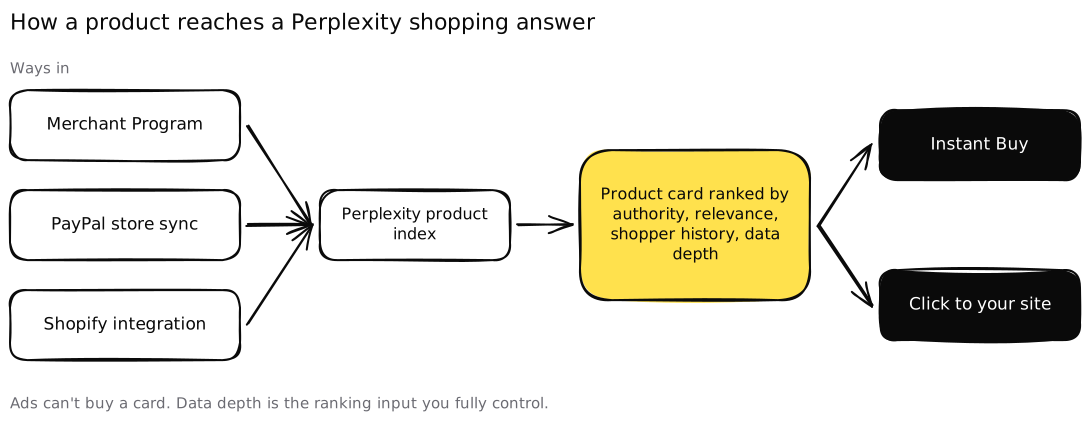 Three routes feed the same index, and data depth is the input you control at the ranking step.
| Route | Who it fits | What it gives you | Source |
|---|---|---|---|
| Merchant Program | Large retailers, any platform | Direct data sharing, payment integration, API, dashboard | Perplexity |
| PayPal store sync | Merchants on Wix, BigCommerce, Feedonomics, Shopware or Cymbio who accept PayPal | Catalog discoverable in Perplexity, checkout through your PayPal setup | PayPal |
| Shopify integration | Shopify stores that sell and ship to the US | Product data through Shopify’s integration with Perplexity | Perplexity, Shopify |
A note for Shopify merchants. Perplexity’s 2024 post says its discovery experience is powered by integrations “including Shopify,” covering Shopify businesses “that sell and ship to the US.” Shopify’s Perplexity shopping guide says Shopify Catalog syndicates product data to “connected AI platforms, including Perplexity,” and that Perplexity checkout goes through PayPal’s Instant Buy rather than Shopify’s checkout. The same guide also says “Perplexity requires joining its Merchant Program.”
Shopify’s own help center page on agentic storefronts names ChatGPT, Google AI Mode and Gemini, Microsoft Copilot and Meta as channels, and doesn’t list Perplexity. So don’t assume you’re covered. Check your admin, search Perplexity for your own products by name, and apply to the Merchant Program anyway.
A note for PayPal merchants. PayPal says “integrations to AI services via PayPal’s store sync may vary by provider.” Ask your platform whether its PayPal integration covers Perplexity before you plan around it.
Step 1: Let Perplexity’s crawlers in
Product feeds don’t replace your website. Perplexity still reads the web to answer the question around the product cards, and it ranks by authority, which it can only judge from pages it can reach.
Perplexity’s crawler documentation lists two agents.
- PerplexityBot “is designed to surface and link websites in search results on Perplexity.” Perplexity recommends allowing it in robots.txt and permitting its published IP ranges.
- Perplexity-User “supports user actions within Perplexity,” fetching a page when a user’s question needs it.
Perplexity says neither is used to train AI foundation models. If you run Cloudflare or AWS WAF, the same page gives rules for allowing both agents by user agent and IP range.
Check it: open yourstore.com/robots.txt and look for any rule blocking PerplexityBot or a blanket block covering /products/. Then ask your security team whether a bot protection rule is challenging it.
Step 2: Choose your entry route
Pick from the table above based on your platform.
- Shopify store: confirm in your admin how your catalog is shared with AI channels, then search Perplexity for three of your products by exact name.
- Wix, BigCommerce, Shopware or Feedonomics: check whether your PayPal integration offers store sync to Perplexity and turn it on.
- Everyone, especially larger retailers: fill in the Merchant Program interest form.
Doing more than one is fine. Perplexity’s index is the destination, and the routes are only ways to feed it.
Step 3: Make every product card worth recommending
This is the step with the most leverage, because “deeper product details such as availability, reviews, pricing, and specifications” is the one ranking input Perplexity names that you fully control.
For each product, make sure the data you send and the page it links to both carry:
- Price and availability per variant. A shopper asking for “under $500” needs a real price, and a sold out size shouldn’t show as available.
- Specifications in plain fields. Dimensions, materials, compatibility, ingredients, care. Write them as text and structured data, not only inside images.
- The use case in words shoppers type. “For small apartments,” “for sensitive skin,” “for wide feet.” Perplexity’s own example queries are written this way.
- Reviews the engine can read. A rating and review count in your product structured data, not only in a widget that loads late.
- Identifiers. Shopify’s guide recommends GTINs or MPNs where you have them, which helps an engine match your product across sources.
Then check consistency. If your feed, your product page and your checkout show three different prices, an engine trying to recommend reliable options has a reason to pick someone else.
Step 4: Get your checkout ready for Instant Buy
If you want shoppers to buy inside Perplexity, you need a checkout Perplexity’s agentic flow is compatible with. Instant Buy is built with PayPal, and PayPal says its agent ready payments work with merchants’ existing PayPal checkout configurations.
Prepare three things before the first order arrives.
- Order routing. Instant Buy orders arrive like any other order. Confirm they land in your order management system with the right shipping method.
- Support scripts. Perplexity sends product and delivery questions to you. Brief your support team that customers may say they “bought it on Perplexity.”
- Returns. You remain the merchant of record, so your normal return policy applies. Make sure it’s stated clearly on your site, where Perplexity can read it.
If Instant Buy isn’t available for your products, you still get the click. Perplexity’s post argues that a shopper who’s been through its conversational flow “has significantly higher intention to purchase,” so make sure the landing page matches the card they just read.
Step 5: Build authority beyond your own pages
Perplexity ranks product listings “based on authority and relevance,” like it ranks sources. Its help center also says Perplexity “analyzes product reviews across multiple sites and filters for the best products.”
So your feed isn’t the whole story. Perplexity reads what others say about you. That means:
- Reviews on the sites shoppers trust in your category, not only on your own store.
- Coverage in the roundups that rank, the “best X for Y” articles Perplexity tends to cite.
- Honest presence in community threads, where real buyers compare options in public pages an answer engine can read. That’s why community work is part of most GEO programs.
Our guide to getting recommended by AI agents covers this source work in more depth, including how to find the pages that shape an assistant’s shortlist.
Step 6: Measure Perplexity referrals and sales
Perplexity sends value two ways, and they show up in different places.
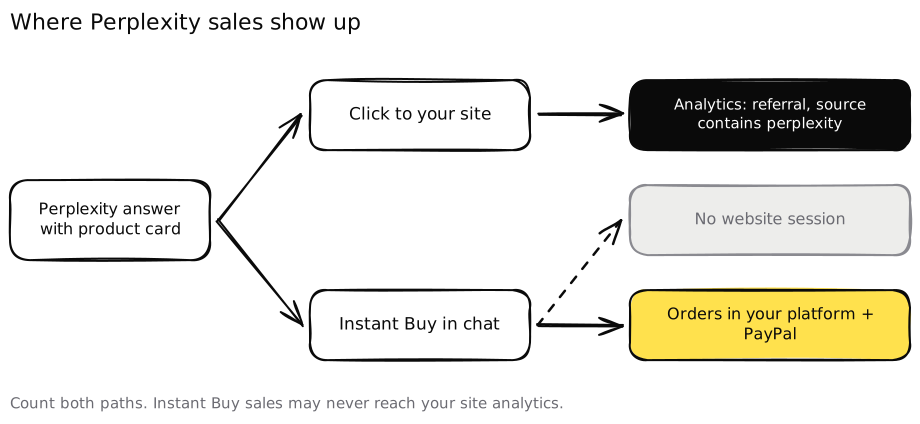 Count both paths, or Instant Buy sales will look like no Perplexity impact at all.
Path 1: clicks to your site. When a shopper clicks through, the visit usually arrives as a referral. Perplexity doesn’t document a UTM parameter for these links, so don’t rely on one. In GA4 or your analytics tool, filter sessions whose source contains “perplexity,” and add it to a custom channel group for AI assistants alongside ChatGPT and Gemini. Our GEO for B2B guide covers that grouping and how to carry the source into your CRM.
Path 2: Instant Buy orders. These sales happen inside Perplexity, so they may never create a website session. Look for them in your commerce platform and PayPal reports instead. Shopify’s help center says orders from AI channels display “with channel or referrer attribution” in the admin, and other platforms differ, so place a test order and see how yours labels it.
Path 3: the dashboard. Perplexity says Merchant Program members get “a custom dashboard” with search and shopping trends that surface their products. If you’re accepted, that’s the only first party view of which queries show your products.
Then add the measure analytics can’t give you. Write 10 shopping questions your buyers would ask, with real constraints like a budget, a size or a use case, and run them in Perplexity each month. Log whether you appear, whether you’re the first card, and whether the price and stock are right. Answers vary from run to run, so treat one result as an anecdote and the monthly trend as the signal. Our AI visibility audit guide explains how to keep that measurement honest.
What about B2B brands?
Instant Buy is a consumer checkout. Its partners are retailers, and its example queries are sofas and skincare. B2B brands don’t need a product feed or PayPal integration to benefit from understanding it, though.
The ranking logic is the same answer engine. Perplexity ranks sources “based on authority and relevance” whether the question is “best standing desk under $500” or “best payroll software for a 50 person company.” The B2B version of this checklist looks like this.
- Step 1 is identical. PerplexityBot needs to reach your pricing, integrations, security and docs pages.
- Step 3 becomes your plan data. Publish plan names, starting prices, seat limits and what each plan includes. An assistant can’t fit you to a budget it can’t see.
- Step 5 becomes review sites and analyst coverage. G2, Capterra, comparison articles and community threads play the role product reviews play for consumer brands.
- Step 6 still applies. Filter for Perplexity referrals and rerun a fixed list of buyer questions monthly.
Plenty of businesses sit in between, like B2B suppliers with online catalogs or brands that sell both to consumers and to companies. They should run both versions.
What not to believe about Perplexity shopping
Plenty of confident claims circulate about Perplexity shopping. We couldn’t verify these on Perplexity’s or PayPal’s own pages, so treat them with care.
- “Products with Instant Buy get a ranking boost.” Perplexity’s help center names authority, relevance, personal history and product detail depth. It doesn’t say checkout eligibility changes ranking.
- Specific GMV, shopper or merchant counts. Figures quoted in vendor blogs don’t appear on Perplexity’s or PayPal’s pages we checked.
- “Guaranteed Perplexity placement.” Perplexity says advertisers can’t pay for product listings. No agency controls them either.
Stick to what Perplexity documents. It’s enough to act on.
Where to start
If you sell physical products to US shoppers, do Steps 1 to 3 this month. Unblock the crawlers, pick your entry route and fill the gaps in your product data. Steps 4 and 6 follow once you can see your products appear. Step 5 is the slow work that runs in parallel.
This is the work we do at Earleads for B2B and B2C brands, from crawler and feed checks to the third party sources AI answers rely on. If you’d like to see where you stand before changing anything, our free AI visibility audit checks how Perplexity, ChatGPT, Gemini and AI Overviews answer your buyers’ questions and where you drop out.
Frequently asked questions
Is the Perplexity Merchant Program free?
Yes. Perplexity's announcement says the program is free for merchants and is separate from its sponsored ad products. The page pitches it at large retailers, and you apply through an interest form. Smaller stores can also reach Perplexity through PayPal's store sync partners or their commerce platform, so check those routes before assuming you're too small.
Can I pay Perplexity to rank my products higher?
No. Perplexity's help center says advertisers can't pay to list their products, and that its algorithm decides product listings based on relevance and ratings. What you can influence is the data Perplexity reads. It says it's more likely to recommend merchants that provide deeper details such as availability, reviews, pricing and specifications.
How does Perplexity Instant Buy work for merchants?
A shopper clicks Instant Buy on a product card, enters their details once, and Perplexity sends the order and payment straight to the merchant. PayPal powers the checkout and the retailer stays the merchant of record, so it handles fulfillment, returns and the customer relationship. Only merchants compatible with Perplexity's agentic checkout are eligible.
Do Shopify stores show up in Perplexity shopping automatically?
Partly, and it's worth checking. Perplexity's launch post says its shopping results are powered by integrations including Shopify, and Shopify's blog says Shopify Catalog syndicates product data to Perplexity. Shopify's help center list of agentic storefront channels doesn't name Perplexity, though, so confirm in your admin and test real queries.
How do I track sales from Perplexity?
Use two views. In your analytics, filter referral sessions whose source contains perplexity and set up a channel group for AI assistants. For Instant Buy, look at orders in your commerce platform and PayPal, because those sales happen in the chat and may never create a website session. Then rerun a fixed list of shopping questions each month.
Does Perplexity shopping matter for B2B brands?
The checkout part is consumer focused today, since Instant Buy covers products from retailers. The ranking logic applies to B2B too. Perplexity ranks sources by authority and relevance, so B2B brands that publish plans, specs, integrations and pricing, and appear on the review sites buyers read, give the engine what it needs to shortlist them.