
Gemini SEO and Copilot: Get Recommended by Workplace AI

Othmane Khadri · Founder, Earleads

Summary
Gemini SEO and Copilot visibility come down to two indexes. Gemini grounds answers on Google Search, and Copilot sends short queries to Bing, including the versions buyers use at work. To get recommended, be readable by both crawlers, answer short brand and category queries on your own pages, and measure each assistant separately.
On this page
- Why the AI inside your buyer’s company matters
- How Gemini grounds its answers
- How Microsoft Copilot grounds its answers
- What this means for Gemini and Copilot visibility
- How to rank in Gemini and Copilot
- Step 1: Let both crawlers read the page
- Step 2: Treat Bing as a first-class index
- Step 3: Answer the short queries an assistant sends
- Step 4: Fix how both assistants describe you
- Step 5: Build the question set from sales, not keyword tools
- Step 6: Measure Gemini and Copilot visibility separately
- Gemini and Copilot for B2B vs B2C
- Common Gemini SEO and Copilot mistakes
Why the AI inside your buyer’s company matters
A growing share of vendor research now happens inside an assistant the buyer’s employer pays for. Forrester’s Buyers’ Journey Survey, 2025, found that 61% of business buyers use private AI tools provided by their organization. The same research says buyers are four times as likely as consumers to use Microsoft Copilot and twice as likely to use ChatGPT, with more than half of the users of each tool on private versions behind their firewall.
Forrester also found that twice as many buyers named generative AI or conversational search as a more meaningful source than any other, ahead of vendor websites, product experts and sales. And a typical buying decision now involves 13 internal stakeholders and nine external influencers, so the assistant is answering for a committee, not one person.
That changes who you need to be visible to. For a company on Google Workspace, it’s often Gemini. For a company on Microsoft 365, it’s Copilot. Most Gemini SEO and Copilot SEO advice treats both as consumer chatbots. The work versions follow different rules. An admin decides whether they can search the web at all, they mix the company’s own files into the answer, and the questions never show up in any keyword tool.
This isn’t only a B2B issue. Gemini can be the default assistant on Android phones, and shoppers ask it which product to buy. The grounding rules below apply to both. Work adds switches you don’t control.
How Gemini grounds its answers
Google uses the same idea across every Gemini product. The model decides whether a search would help, writes its own queries, runs them and answers from the results. The Gemini API documentation says it plainly: “the model automatically generates one or multiple search queries and executes them.” What differs is which index it can reach.
| Gemini surface | Where web answers come from | Source |
|---|---|---|
| Gemini app, personal account | “Some Gemini responses are grounded on Search results” | Gemini Apps Privacy Hub |
| Gemini app, Workspace account | Google Search used as a grounding source, processed ephemerally, logs redacted from Search logs | Generative AI in Google Workspace Privacy Hub |
| Gemini Enterprise | The admin picks “Google search” or “Enterprise web search (Data Residency compliant)” | Gemini Enterprise docs |
| Enterprise web search | “A subset of what’s available on Google Search,” built for finance, healthcare and the public sector | Web Grounding for Enterprise |
Three details matter for visibility.
Not every answer is grounded. Google’s help page says “not all responses include related links or sources”. When Gemini answers from its training data alone, there’s no page to cite, and whatever the model learned about you is what the buyer reads. That’s why stale or wrong descriptions are worth fixing at the source.
Work answers mix in company data. Gemini’s sources can include documents and emails from Google Workspace when the account is connected. Your page competes with a rival’s proposal sitting in the buyer’s inbox.
Regulated buyers may see a smaller web. If a bank or a hospital group chooses Enterprise web search, Gemini grounds on a subset of the Google Search index. Google’s documentation describes it only as a subset, so if you sell into regulated industries, test the questions those buyers ask instead of assuming. Our guide to GEO for regulated industries covers the rest of that buying context.
How Microsoft Copilot grounds its answers
Microsoft documents this in unusual detail. Its page on web search in Microsoft Copilot and Copilot Chat, updated August 2026, is worth reading in full. A note at the top says Microsoft 365 Copilot is now named Microsoft Copilot. The key points:
- Web search is optional. When it’s on, Copilot “may fetch information from the Bing search service” when the web would help.
- Bing doesn’t see the whole prompt. Copilot sends a generated query that is “a few words informed by the user’s prompt,” not the whole prompt (unless it’s very short), never whole files and never the user’s identity.
- The answer has two halves. In Microsoft’s own example about researching a company, the response has a section “From your company’s data” and another “From the web.”
- Admins hold the switch. A policy called “Allow web search in Copilot” can turn web search on, off, or off only in Work mode. Users get a Web content toggle on top. For US government cloud customers, it’s off by default.
- Copilot Chat shows its queries. The citation section lists the exact searches sent to Bing, kept for 24 hours. The Copilot pane inside Word or PowerPoint doesn’t show them.
Microsoft also says these queries don’t affect Bing’s search ranking or its Auto Suggest features. A buyer asking Copilot about your category leaves no trace you can see in keyword data.
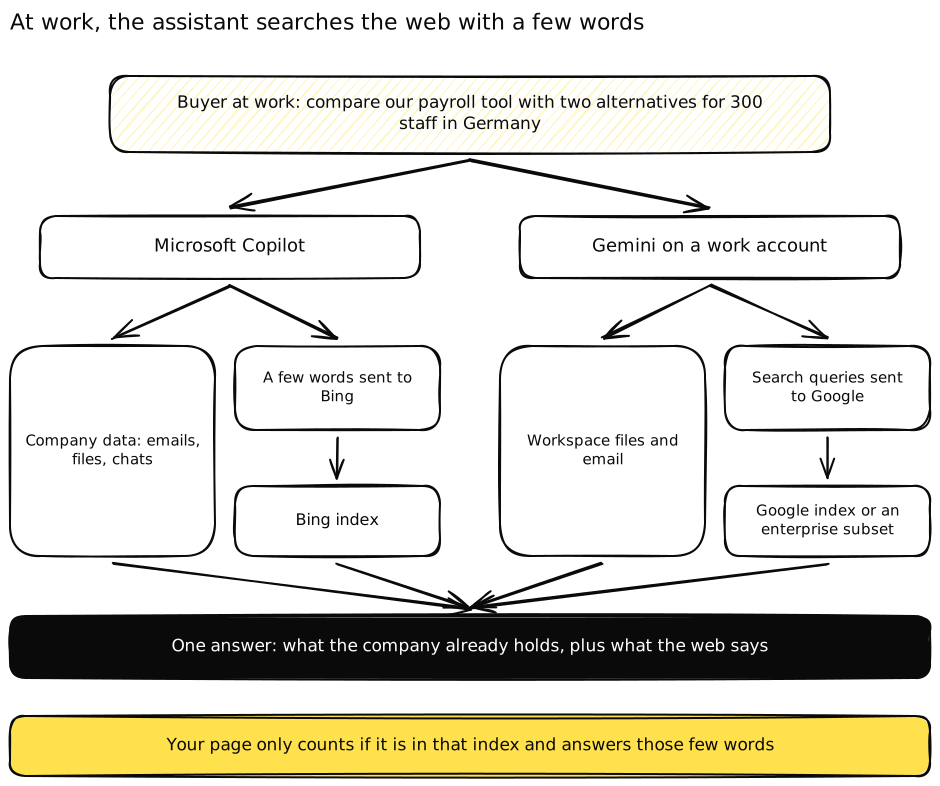 At work, both assistants search the web with a few words, then blend the results with what the company already holds.
What this means for Gemini and Copilot visibility
Read the two sets of documentation side by side and four consequences follow.
Classic indexing is the entry ticket, twice. Gemini quotes from Google’s index. Copilot quotes from Bing’s. A page missing from Bing is invisible to every Microsoft 365 buyer who asks Copilot, however well it ranks on Google. The broader ranking signals are covered in our guide to AI search ranking factors.
The web query is short and specific. Microsoft’s examples are queries like a company name plus “strategy” or “financials.” A buyer’s long question about replacing a tool for a 300-person team becomes a handful of short searches about your brand, your category and a topic. This is the same splitting Google calls query fan-out, done by a different engine.
The questions are invisible to you. Google redacts Workspace grounding from Search logs. Microsoft keeps Copilot’s queries out of Bing’s features. Keyword tools won’t show you what a buying committee asked its assistant on Tuesday.
Someone else can switch you off. An admin who disables web search, or picks a smaller enterprise index, decides that the assistant answers from training data and internal files. You can’t change their settings. You can make sure that what the model already knows about you is right, and that your name is in the documents buyers share internally.
How to rank in Gemini and Copilot
Neither assistant ranks pages in a list, so “rank” really means being one of the few sources an answer leans on and being described the way you’d describe yourself. The steps below cover both engines and both B2B and B2C brands.
Step 1: Let both crawlers read the page
At Earleads, crawler access is the first thing checked in an audit, because if AI systems can’t read a site, nothing else measured about it is worth much. For Gemini and Copilot, check four things.
- Google-Extended. Google’s crawler documentation says this robots.txt token controls training of future Gemini models “and for grounding” in Gemini Apps and in Grounding with Google Search on Vertex AI. Blocking it “does not impact a site’s inclusion in Google Search.” So a site can rank well on Google and still be unusable as a source in Gemini Apps. If someone added that rule to opt out of training, they may have opted out of Gemini answers too.
- Bing’s answer controls. When Copilot was still called Bing Chat, Bing documented two meta tags. NOCACHE lets content appear in answers with only the URL, title and snippet. NOARCHIVE keeps it out of answers and unlinked. Find out whether a plugin or a past project set either of them.
- Text in the HTML. A page that renders its words through JavaScript can look like an empty shell to a crawler. One of the worst cases we’ve worked on wasn’t a robots.txt rule at all. A site theme served every word through JavaScript, and AI crawlers saw code instead of text.
- CDN and plugin settings. Bot protection switched on without anyone deciding, or a plugin that blocks every AI bot, cuts you off without a single line in robots.txt. Testing by changing your browser’s user agent proves little, because CDNs check the real source of the request. Check server logs instead.
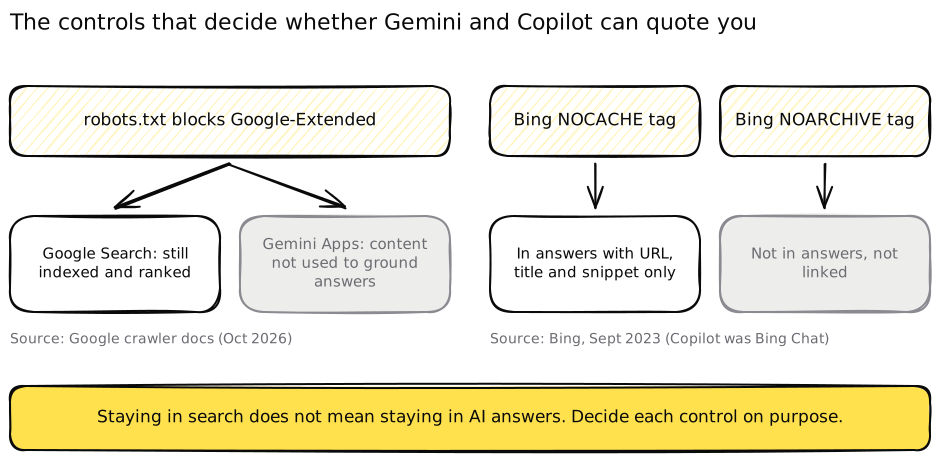 The controls that keep you in search are not the ones that keep you in AI answers. Decide each one on purpose.
Our full checklist is in blocking AI crawlers by accident.
Step 2: Treat Bing as a first-class index
Many teams verify a site in Google Search Console and never open Bing Webmaster Tools. For Copilot, that’s the main dashboard.
- Verify the site in Bing Webmaster Tools and submit your sitemap.
- Turn on IndexNow. Bing’s own post says IndexNow “helps ensure that AI systems reference the most current version of a page” by notifying search engines whenever content is added, updated or removed. Price changes and feature launches are exactly what you want picked up fast.
- Local businesses: register with Bing Places. Bing names it as the way to keep address, hours and contact details eligible for AI answers to location-based questions. For a clinic, a shop or a restaurant, this is the cheapest Copilot win available.
- Compare coverage. Pull the URLs you care about and check each one is indexed in both engines. Gaps tend to cluster on new sections, JavaScript-heavy templates or pages blocked during a redesign.
Step 3: Answer the short queries an assistant sends
Because the assistant searches with a few words, the page that wins is the one that answers those few words cleanly. For most brands, they fall into a predictable set.
| Short query an assistant might send | Page that should answer it |
|---|---|
| Your brand + pricing | A pricing page with prices in text, dated, with what each plan includes and excludes |
| Your brand + security, compliance or data residency | A security page that states certifications, hosting regions and policies in plain text |
| Your brand + integrations | One page per major integration, with what syncs and what doesn’t |
| Your brand vs a named rival | A comparison page with a table first and an honest verdict on who each option suits |
| Category + company size or country | A page for that segment, with real constraints rather than a reworded homepage |
| Product + sizing, returns or delivery (B2C) | Product and policy pages with the facts in text, not inside images or tabs |
Bing’s guidance on its AI report lines up with this. It recommends clear headings, tables and FAQ sections, claims supported with examples, data and cited sources, and regular updates. Write each section so its first two sentences answer the heading, and put the date on anything that changes. We go deeper on passage-level writing in how to get cited by AI.
Two traps are specific to work assistants. First, gated content is invisible. A whitepaper behind a form can’t be quoted by Gemini or Copilot, while the rival’s ungated page can. Second, the buyer’s own files compete with you. If the most detailed document about your product in a prospect’s tenant is an old proposal, the assistant may lean on it. Give sales a current one-page fact sheet to send, so the file inside the buyer’s company is right too.
Step 4: Fix how both assistants describe you
Being named isn’t the same as being recommended. An assistant can mention you as “a basic option for small teams” when you sell to enterprises, or repeat a pricing tier you dropped last year. When web search is off, that description comes from the model’s memory, so the fix has to happen in the sources it learned from and the sources it reads today.
Every Earleads audit includes an AI accuracy check for this reason. Each factual claim the engines make about pricing, product, positioning and leadership is listed, with what’s wrong or stale and the source each answer leans on. The fix is to correct the source where it lives, whether that’s your own page with dated plain-text facts, the directory and review listings answers cite, or the community thread that keeps getting quoted. Then publish the correct version on pages the engines already read and re-run the questions until the description holds.
Ask sales to log any claim a prospect repeats from an assistant. The most damaging wrong answer is the one sales hears first, on a live call, from someone who pasted it in from a work tool. For the entity side (how engines connect your brand, products and people), see knowledge graph optimization, and for repair work, AI reputation management.
Step 5: Build the question set from sales, not keyword tools
If the questions buyers ask their work assistant can’t be seen, a keyword tool can’t give them to you. Earleads builds each client’s tracked questions from positioning and sales language, and keeps a question only if an answer exists and the client is missing from its sources. The client signs off the list before anything is measured.
Three habits make the set useful for Gemini and Copilot.
- Write questions the way a committee member would type them at work. “Which payroll tools handle multi-country contractors for a 300-person company” is a real work prompt. “Best payroll software” is a search habit.
- Add validation questions. “Is [brand] legit,” “is [brand] secure enough for a bank,” “what do customers say about [brand].” These separate a trust problem from a findability problem.
- Assign each question a surface. Named comparisons and facts belong on your site. First-person experience questions (“did switching hurt our payroll run”) are answered by people in forums and online communities, and that’s where your answer needs to live.
Ask sales to note which assistant each prospect’s company uses. It tells you whether to weight Gemini or Copilot for that segment.
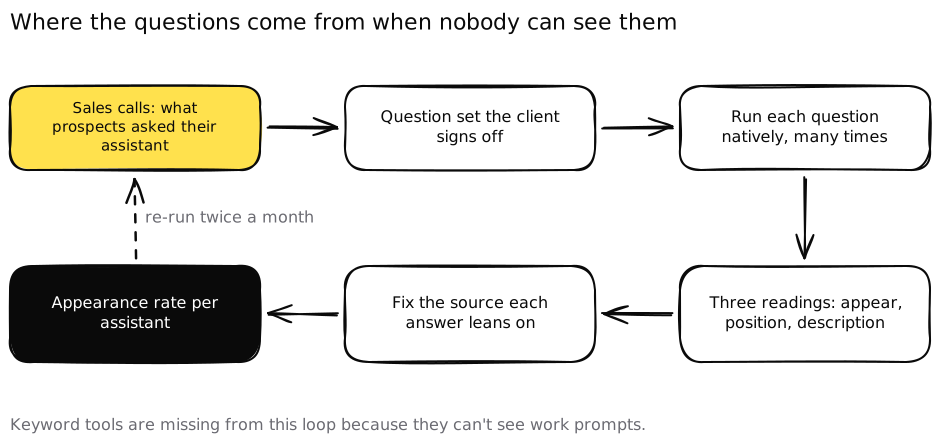 The questions come from sales calls because no keyword tool can see what buyers ask their work assistant.
Step 6: Measure Gemini and Copilot visibility separately
The two assistants read different indexes, so one blended “AI visibility” number hides the gap you most need to see.
Run questions natively. Earleads runs every tracked question inside each engine on paid subscriptions, Gemini included, because API answers aren’t what buyers see. Each run produces three readings: whether you appear against named competitors, your position when you do, and how the engine describes you. Priority questions are sampled many times per engine and reported as an appearance rate, never a rank, re-measured twice a month. For the maths, see AI share of voice.
Use Bing’s AI Performance report for Copilot. Microsoft launched it in public preview in February 2026 across Microsoft Copilot, AI summaries in Bing and select partner integrations. It shows total citations, average cited pages, page-level citations and grounding queries, which Bing defines as “the key phrases the AI used when retrieving content.” In June 2026, Bing added Intents, Topics, Citation Share and Compare in preview, classifying grounding queries into types such as Commercial, Research and Local. The grounding queries are the closest view you’ll get of the short searches Copilot runs.
Know what Google reports and what it doesn’t. Google counts AI Overviews and AI Mode traffic inside the “Web” search type of the Search Console Performance report (Google Search Central). Google’s documentation covers AI features in Search and doesn’t describe a report for answers in the Gemini app, so native runs are how you see those.
Ask at signup. A “how did you hear about us” field with Gemini and Copilot as named options catches the buyer whose assistant mentioned you and who then typed your domain. Referral analytics will miss them. We cover tying this to pipeline in AI search analytics.
Gemini and Copilot for B2B vs B2C
B2B: the committee asks at work. The champion asks for a shortlist. Finance asks about cost. IT asks whether you meet their security rules. Each is a different short query, often in a different assistant if the company runs both suites. The pages that decide these deals are often dull ones, like security, data residency, a specific integration or pricing for a team of that size. Our guide to GEO for B2B covers how AI shortlists vendors.
B2C: the assistant is on the phone. Shoppers ask Gemini on Android which product suits them, or ask Copilot for a comparison. The facts live in product pages, size guides and return policies. Opinions live in reviews and forum threads. Local businesses add a third surface, their Bing Places and other listings. For product data and shopping assistants, see is your store visible to AI shopping agents.
In both cases, the factual answers are won on your own site and listings, and the “did it work for you” answers are won off it.
Common Gemini SEO and Copilot mistakes
Optimizing for Google only. A Microsoft 365 company’s buyers ask Copilot, and Copilot reads Bing. Skipping Bing Webmaster Tools leaves that whole audience unmeasured.
Blocking Google-Extended without knowing what it does. It controls grounding in Gemini Apps, not just training. Make the call deliberately and write down why.
Gating the content that answers buying questions. If the security overview or the pricing guide sits behind a form, the assistant quotes someone else’s.
Treating the consumer chatbot as the whole picture. The work versions can have web search off or grounded on a smaller index, and they blend in the buyer’s own files. Test what you can, and make sure the files sales sends are current.
Reporting one blended AI number. Gemini and Copilot can disagree about you. Report them separately, with how each describes you, not just whether you appear.
Expecting a ranking position. Neither assistant gives one. Measure how often you’re named across repeated runs, and judge progress by appearance rate and description. An AI visibility audit should show you where you stand on both before anyone starts writing, and you can request one here.
Get a personalised case study
Pick your industry and we'll email you the case closest to your business, numbers included.
Frequently asked questions
How do I rank in Gemini?
Gemini doesn't rank pages the way a results page does. Google says some Gemini responses are grounded on Search results, so the pages Gemini can quote come from Google's index. Start with pages that are indexed, readable without JavaScript and open to Google-Extended if you want Gemini Apps to use them. Then answer the exact questions buyers ask, with dated facts and tables, and check how often Gemini names you.
Does Microsoft Copilot use Bing to answer questions?
Yes, when web search is on. Microsoft's documentation says Copilot and Copilot Chat may fetch information from the Bing search service. Copilot turns the prompt into a short search query of a few words, sends that to Bing and writes the answer from what comes back, next to anything it found in the company's own data. A page that isn't in Bing's index isn't a candidate.
Can I see the questions buyers ask Gemini or Copilot at work?
Not directly. Google says Search grounding logs from the Gemini app on Workspace accounts are redacted from Search logs, and Microsoft says the queries Copilot sends to Bing don't feed ranking or Auto Suggest. Bing Webmaster Tools does show the grounding phrases behind your citations. For the questions themselves, ask sales which prompts prospects mention and which assistant their company uses.
Does blocking Google-Extended remove my site from Gemini?
It removes your content from more than training. Google's crawler documentation says Google-Extended also controls whether content from the Google Search index is used for grounding in Gemini Apps and in Grounding with Google Search on Vertex AI. Google adds that blocking it doesn't affect inclusion or ranking in Google Search. So you can rank on Google and still be absent from Gemini's answers.
How do I check if Copilot cites my website?
Verify your site in Bing Webmaster Tools and open the AI Performance report. Microsoft launched it in February 2026 and says it covers Microsoft Copilot, AI summaries in Bing and select partner integrations. It shows total citations, cited pages and the grounding queries that led to them. In Copilot Chat, the citation section also lists the exact web queries Copilot sent to Bing.
Is Gemini SEO different from regular SEO?
The entry ticket is the same. Gemini grounds on Google Search, so a page that can't be indexed or read won't be quoted. What changes is the target. You plan for questions instead of keywords, for being named and described correctly instead of ranked, and for a second index, Bing, because buyers who work in Microsoft tools ask Copilot instead.